SharePoint Data Room: Investor Ready Due Diligence in Microsoft 365
Your SharePoint Tenant Is Already a Data Room. Most Teams Don't Know It.
TL;DR: When investors or acquirers come knocking, most organizations scramble to set up a third-party virtual data room at high cost. If you're running Microsoft 365, you already have the infrastructure in place. This article explains how to build a secure, auditable, investor-ready due diligence data room in SharePoint and what it takes to do it right.
The Moment You Realize You're Not Ready
Most mid-market companies treat the data room as a line item that appears only after a deal is already in motion. Once a potential investor or acquirer signals interest, teams quickly begin evaluating third-party virtual data room platforms such as Intralinks, Datasite, or Firmex. Pricing comparisons follow, seat licenses are negotiated, and documents are rushed into an unfamiliar system under tight deadlines.
This pattern is so common that it is rarely questioned. But you should. Organizations already running Microsoft 365 have the underlying security, permissions, and audit infrastructure required to support an investor-grade data room. The challenge is not the platform. It is the lack of a deliberate architecture and governance model.
This guide will demonstrate how to set up a due diligence data room with confidence.
Why M&A Due Diligence Is Getting More Demanding
M&A activity is picking up pace. According to PwC’s 2026 Global M&A outlook, global deal values rose 36% in 2025 versus 2024, driven by a resurgence of megadeals, with value expected to remain elevated even as overall volumes stay muted. At the same time, investors are conducting more thorough due diligence. They now commonly request ESG documentation, cybersecurity posture assessments, and evidence of data privacy compliance, in addition to the usual financial and legal checks.
Organizations that are not ready to provide structured, permission-controlled access to documents for outside parties may not only waste time but also risk their credibility. An unorganized or insecure data room can signal operational immaturity to savvy investors, regardless of the financial projections. The best solution is not necessarily to buy, configure, and migrate content to a brand-new service from yet another vendor; instead, it’s about setting up an effective, thoughtfully designed solution using the platform you already know.
What Makes a Data Room "Investor Grade"
Before diving into configuration, let's clarify what investors and their legal teams need from a data room:
- Document completeness and organized structure: A clear folder system that follows standard due diligence categories like legal, financial, HR, IP, contracts, and compliance.
- Precise access control: Different advisors, investors, and legal groups should have tailored permission levels so that not everyone gets the same open access.
- Audit logging: Key activities, such as viewing, downloading, sharing, permission changes, and access attempts, should be recorded in a defensible audit trail that is retained for the required period and can be exported or archived when the deal requires independent evidence to be preserved.
- Watermarking and download restrictions: Sensitive documents might need to be viewed without downloading, with identity-stamped watermarks for added security.
- Version control: Only final, approved documents should be accessible to outside parties.
- Quick revocation: If a deal doesn’t go through, access must be revoked immediately and in full.
The SharePoint Online and broader Microsoft 365 platforms can support these requirements when they are deliberately configured, licensed, governed, and validated against the specific needs of the transaction.
How to Build a Data Room in SharePoint Online (Step‑by‑Step Model)
Step 1: Define your Site Architecture and Document Taxonomy
The goal of the site architecture is to create a single, controlled perimeter where everything is easy to review, grant permissions to, and shut down when the deal changes. That’s why isolating the data room into its own dedicated site collection is the first non-negotiable decision. It reduces accidental inheritance, simplifies the audit scope, and ensures a clean revocation if the deal stalls.
To make the structure “investor-readable,” your taxonomy should do two things at once:
- Match how diligence teams think (legal, financial, HR, IP, compliance)
- Make completeness obvious (reviewers can quickly tell what exists, what’s missing, and what’s outdated)
Structure your document library using a folder hierarchy aligned with standard due diligence categories:
- 01 Corporate Structure (articles of incorporation, org charts, board minutes)
- 02 Financial Statements (audited financials, projections, cap table)
- 03 Legal and Contracts (customer agreements, supplier contracts, IP assignments)
- 04 HR and Compensation (headcount, equity schedules, key employee agreements)
- 05 Technology and IP (architecture docs, patents, software licenses)
- 06 Regulatory and Compliance (certifications, audit reports, privacy documentation)
Numbering folders enforces consistent ordering across views and serves as a small but meaningful signal of operational discipline for the reviewer.
Within each top-level folder, keep naming conventions boring and consistent. In diligence, clarity beats creativity. Use patterns like:
- 03.01 Customer Contracts
- 03.02 Supplier Agreements
- 02.03 Forecasts & Projections
- 06.04 Privacy & Security Policies
This reduces reviewer friction and prevents the classic “where does this go?” chaos when multiple departments are uploading under time pressure.
Step 2: Design the Permission Architecture
Permission architecture is often the weak point of DIY data rooms. A data room doesn’t fail simply because SharePoint lacks permission capabilities; it fails because teams attempt to adjust permissions after invitations are sent. Due diligence access should be carefully planned, not negotiated on the spot. This involves establishing access levels beforehand, associating them with specific folders, and applying these rules consistently.
Before inviting any external user, document three decisions:
- Who are the audiences (investor group, legal counsel, technical advisor)?
- What should each audience see (which folders and subfolders)?
- What can they do (web view-only, download, or contribute)? Most external reviewers should be view-only.
The most common mistake is treating the site as a single permission zone. In reality, diligence is layered:
- HR compensation and equity schedules often require stricter scoping than financial statements
- Technical reviewers rarely need HR or legal access
- Some investor groups may receive access earlier than others
Default SharePoint permissions are too coarse for due diligence scenarios, where Investor Group A should not have access to HR compensation data, but Investor Group B should have full access. If your team needs to grant exceptions, treat them like change requests: document them, set time limits, and remove them when the review phase ends.
Use SharePoint permission groups with unique permissions (broken inheritance) at the folder level to enforce document-level access tiers. Define your access tiers before inviting a single external user:
- Tier 1 (Full Access): Legal counsel and senior deal team members
- Tier 2 (Commercial): Investors reviewing business and financial documents only
- Tier 3 (Technical): Technical reviewers scoped to technology and IP folders only
Never grant Site Member or Site Owner permissions to external users. External participants should always enter as Guests with view-only access, scoped to their folder tier.
Two configuration habits close the gaps that most DIY data rooms miss:
- Grant site access through the Viewers group, then break permissions at the library level. Give external users access to the site via the Viewers group, then break inheritance on the library and assign access using the group you created for that audience. This matters for more than just tidiness: any user added to the site with the Members role can open/catalogues/users/detail.aspx page and see everyone who has been added to the site. Members of the Viewers group cannot reach that page.
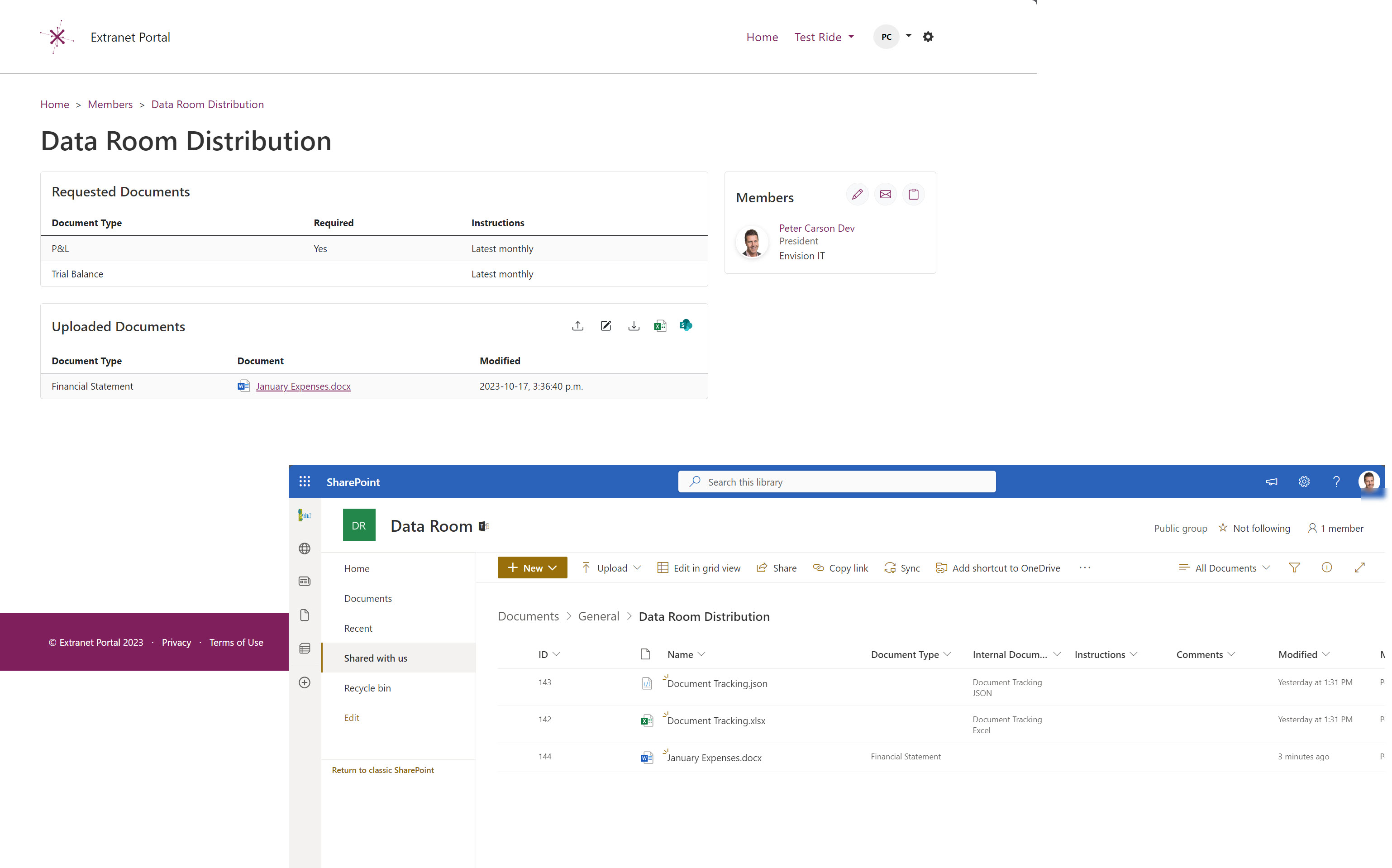
- Assign all access through AD groups, then assign those groups to the site. Assigning access directly to a SharePoint group on the site creates a similar exposure, where /_layouts/15/people.aspx?MembershipGroup=0 reveals everyone with direct access. Routing access through directory-managed groups avoids this. Extranet User Manager (EUM) assigns all Data Room guests to groups managed in Entra ID, so these issues are prevented by design.
Step 3: Manage External Users for Due Diligence
Managing a data room in SharePoint can become quite challenging as your project grows. For example, during a Series B raise involving three investor groups, two law firms, and an advisory firm, there could be over 40 external users, all of whom need carefully managed, limited-time access.
Handling this external access smoothly is key to keeping the diligence process on track. It’s not just about "adding guests," but about overseeing the entire lifecycle of their access under deal pressures, such as:
- onboarding multiple firms quickly
- making sure the right people are assigned to the right access tiers
- expiring access when different phases are completed
- revoking access immediately if the deal is paused, and
- maintaining a clear, defensible record of who had access, when, and why.
In many organizations, the legal or finance team handling diligence doesn’t have the permissions (or time) to administer guest access at scale safely. That’s how you get “permissions sprawl,” where access is granted quickly and never tightened.
Managing this kind of external access at scale (onboarding multiple firms, enforcing time-limited permissions, and cleanly revoking access as deal phases change) is where native SharePoint tooling starts to show its limits. Microsoft provides the security infrastructure, but it doesn't provide a purpose-built interface for governing guest lifecycles under deal pressure.
Extranet User Manager (EUM), built by Envision IT, is a SharePoint-native external collaboration platform designed specifically to close this gap. Running within your existing Microsoft 365 tenant and built on Entra ID B2B, it enables business teams to onboard external users by group, assign them to specific access tiers, enforce expiry dates, and revoke access immediately when a deal stalls or completes. With over 100 organizations deployed globally, EUM is purpose-built for structured external sharing scenarios such as due diligence, where the ability to share and govern that sharing separates a credible data room from a shared folder.
Step 4: Enable Microsoft Purview Unified Audit Logs for the Data Room
Microsoft 365 can capture access events through the Unified Audit Log in the Microsoft Purview compliance portal. Organizations should confirm that auditing is enabled, that the required workloads and activities are captured, and that retention is configured for the full deal period plus an appropriate buffer.
Audit logging is essential for converting a SharePoint site into a secure data room. Merely believing that access is controlled isn’t enough. You must be able to demonstrate it. Therefore, audit logging must be integrated into your plan’s design from the start, rather than being considered a final reporting checkpoint after the deal.
During active diligence, don’t wait until the end to review logs. Establish a simple cadence:
- Export logs at scheduled intervals during the review period
- Confirm that the access activity aligns with the expected reviewers
- Validate that revocations and permission changes appear in the activity trail
Configure audit log retention policies in Microsoft Purview to retain data room activity logs for at least 12 months. Confirm retention requirements with legal counsel, as “sufficient” retention depends on deal type and regulatory exposure. If your deal involves publicly traded securities, consult your legal team, as securities regulations may require a longer retention period.
Configure audit log retention policies in Microsoft Purview to retain data room activity logs for the full deal period. Retention length depends on your licensing: 180 days is the standard retention window.
Extending beyond that requires additional licensing. Purview Suite or E5 provides up to 365 days of retention, while Audit (Premium) supports up to 10 years of retention. If your required retention period exceeds what your licensing covers, shipping logs to an immutable Azure Storage account is an acceptable workaround that preserves a defensible, tamper-resistant record.
Confirm retention requirements with legal counsel, as "sufficient" retention depends on deal type and regulatory exposure. If your deal involves publicly traded securities, consult your legal team, as securities regulations may require a longer retention period. Regularly export and review audit logs during the active due diligence period. Knowing who accessed what and when is not just a compliance requirement. It's deal intelligence.
Auditing External Access: SharePoint and EUM Working Together
File access activity in a SharePoint-based data room should be captured in the Microsoft Purview Unified Audit Log, including activity by external users. Teams should validate the specific events they need during a dry run before relying on the logs for legal review, compliance validation, or post-deal investigation.
Extranet User Manager does not replace Microsoft’s audit logging; rather, it complements it by managing the granting, time-limiting, and revocation of external access. By structuring guest access through defined groups, expiration policies, and approval workflows, every event recorded in the audit log can be traced back to an intentional access decision rather than to random access sharing.
Together, SharePoint auditing and EUM’s access governance create a defensible due diligence model: Microsoft records what happened; EUM explains why it was allowed.
Step 5: Apply Sensitivity Labels and Information Protection
Apply Microsoft Purview sensitivity labels to documents in the data room. Think of sensitivity labels as the “seatbelt” that stays with the document even when everything else goes wrong—permissions control who can access content. Labels help control what happens after content is accessed, especially in high-risk folders such as cap tables, equity schedules, and employment agreements.
At a minimum, configure:
- A "Confidential - Due Diligence" label that restricts forwarding, printing, and copying
- A "Highly Confidential - Restricted" label for cap tables, equity schedules, and employment agreements, paired with Conditional Access or session controls to enforce encryption and block downloads
A simple approach that works well during diligence is:
- One baseline label for most of the room content (due diligence, restricted sharing behaviour)
- One stricter label for the handful of documents that are most sensitive (encryption and blocked download controls for the “top risk” artifacts)
This prevents labels from becoming overly complex while still protecting the documents investors care about most.
Labels travel with the document. Even if someone takes a screenshot of a watermarked PDF or the URL leaks, the document-level encryption controls remain in place. The goal is to ensure protection isn’t dependent on a single permission setting remaining perfect forever.
Why Rent a Data Room When You Already Own One?
If you’re already on Microsoft 365, you already have the foundation for an investor‑ready data room. The difference between “we can share a folder” and “we’re diligence‑ready” is architecture plus discipline: structure, permission tiers, audit visibility, and controlled external access.
When all the materials are organized before the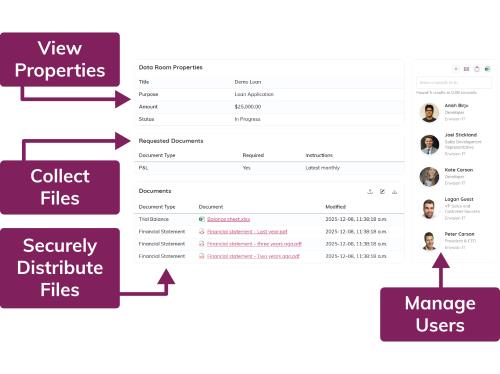 investor begins their inquiries, the deal dynamics shift. Rather than responding to a two-week deadline, you are operating from a place of preparedness. Investors notice this difference. A clean, well-managed, and auditable data room demonstrates operational maturity in a way that a disorganized, rushed portal simply cannot.
Just as importantly, building this inside your existing Microsoft 365 tenant means it doesn’t disappear when the deal closes. The model is reusable: the same site structure, access tiers, and governance habits. Next time you need a diligence room (fundraise, acquisition, audit, partner review), you aren’t starting from zero. You’re turning on a capability you already run.
A data room shouldn’t be a one‑time fire drill. It should be a repeatable, governed way of working. Build it once. Build it right.
Next Step: Ready to Build Your Data Room Inside Microsoft 365?
Book a 30-minute data room architecture review with Envision IT. We'll assess your SharePoint environment, identify gaps in access control, and provide a clear configuration roadmap ahead of the investor call.
Frequently Asked Questions: SharePoint as a Virtual Data Room
Subscribe to Modern Work Monthly
Get the latest Microsoft 365 + Copilot insights to help your teams work smarter, faster.
We respect your inbox. Unsubscribe anytime.