Structure First: How Information Architecture Powers Modern SharePoint Online Intranets
Work has fundamentally changed. Today's digital workplace is hybrid, filled with tools, fast-moving, and dispersed, and many intranets haven't kept up. What used to be simple portals for documents and company news now need to support how people actually work: finding information quickly, collaborating across teams, and staying aligned amidst constant movement.
For organizations using Microsoft 365, SharePoint Online offers a strong foundation for creating a modern digital workplace. However, technology alone isn't sufficient. The success of a SharePoint intranet depends on its structure: a clear, intentional information architecture (IA). Without a "structure first" approach, even the most feature-filled intranet can become cluttered, difficult to navigate, and ultimately ignored.
Related reading: Is Your Intranet Stuck in 2015? 5 Strategic Shifts to Build a Modern Intranet
This article explains why structure is crucial for a successful modern intranet in SharePoint Online and highlights the core principles for creating a user-friendly, scalable, and trusted digital workspace for employees.
The Hidden Costs of Poor Digital Environments
When digital environments are fragmented or poorly designed, the effects spread throughout the entire organization. Employees spend an average of 1.8 hours per day searching for information, nearly nine full work weeks each year, lost to inefficiency. This wasted time is not only frustrating but also operationally costly.
Poorly designed digital environments also directly lead to disengagement and turnover. Knowledge workers managing fragmented systems and unclear sources of truth face increased stress and reduced confidence in their tools, a major factor behind rising voluntary turnover in modern workplaces.
Productivity also suffers. Research indicates that context switching and fragmented communication tools can decrease individual productivity by up to 40%, as employees constantly reorient themselves across apps, conversations, and document versions.
Together, these figures tell a clear story: poor digital environments quietly drain time, talent, and trust, long before organizations realize the cost.
A lack of technology does not cause these challenges. Most organizations already have many tools. The real issue is the lack of a clear, structured digital environment that seamlessly combines those tools, content, and experiences.
This is where the modern intranet serves a vital role; not as a static repository, but as the foundational link of digital work.
Introduction to the Modern Intranet
A modern intranet serves as the central digital workspace for an organization, providing employees with a unified, efficient platform to access company information, resources, tools, and communications. It is the main place where staff begin and end their workday, accessing everything from official policies and templates to project updates and team discussions. The success of this digital workspace relies directly on its usability and search capabilities, which are mainly influenced by its information architecture.
Why Information Architecture Is the Backbone of a Modern Intranet
Information Architecture (IA) is the practice of organizing, structuring, and labelling content in an effective and sustainable way. In an intranet, the IA dictates how information is arranged, how users navigate through it, and how effectively they can search for and retrieve what they need.
A well-designed intranet IA ensures that users can easily answer critical questions such as "Where would I go for this?" "What is the official source of truth?", and "What is relevant to me?" Without a thoughtful IA, even a SharePoint Online platform, capable of rich content management and advanced search capabilities, can become overwhelming and difficult to navigate.
Define your information architecture early and intentionally. Your structural decisions set the foundation for content organization, governance, search, navigation, and future AI-driven experiences.
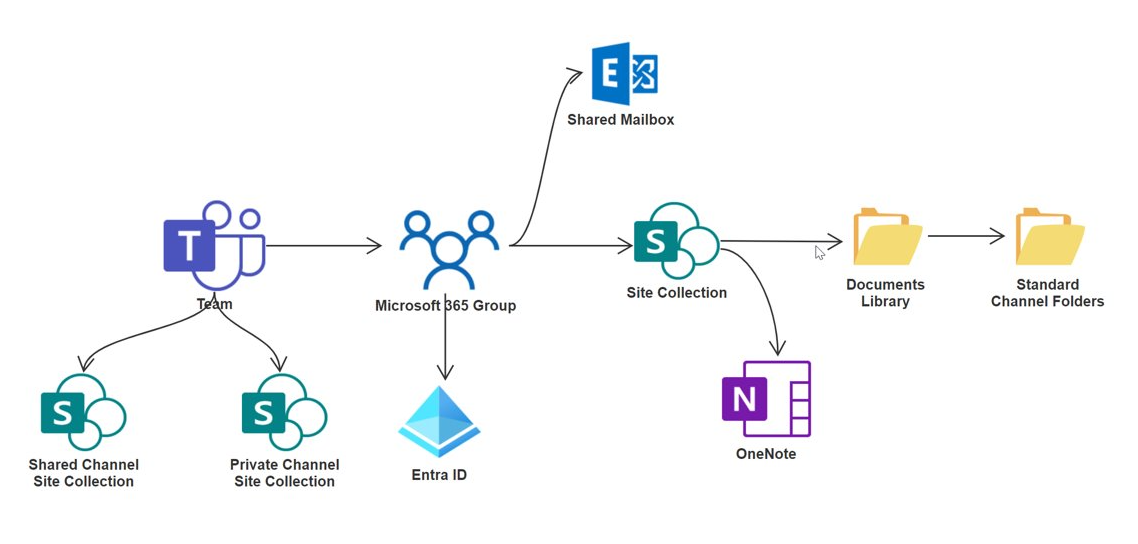
A Teams-Centric IA can be Beneficial for Several Reasons
- Improved collaboration and communication: Organizations focused on teamwork and cross-departmental projects can leverage Microsoft Teams to streamline communication and collaboration. Examples include technology firms, consulting agencies, and educational institutions, where real-time collaboration is key.
- Centralized data management: Businesses that handle large volumes of data and require centralized management can benefit from a Teams-centric IA.
- Integrated workflow management: Companies with complex, multistep workflows can use Microsoft 365 integrations to streamline work, making this IA especially valuable for project management firms and marketing agencies.
A well-defined Information Architecture (IA) transforms a chaotic digital space into an intuitive digital workplace where information is easy to find, use, and share.
For a more in-depth read on Teams First IA, continue reading: Why Your Microsoft 365 Adoption Needs a Teams-First Approach.

Why SharePoint Online is the Platform of Choice for Modern Intranets
Many organizations choose Microsoft SharePoint because information is scattered across email, shared drives, chat threads, personal OneDrive folders, and disconnected tools.
For organizations on Microsoft 365, a modern SharePoint intranet provides a trusted, central starting point. For those already invested in the Microsoft ecosystem, SharePoint Online integrates seamlessly with familiar tools like Teams, Outlook, and OneDrive, creating a consistent and efficient user experience.
When organizations implement SharePoint Online effectively, they unlock several key benefits:
- Communication and knowledge coexist rather than compete through different channels. News posts can point directly to policies, forms, and how-to guides
- Navigation and search are unified across sites, hubs, and even into Teams and Outlook
- Governance and security controls are consistent, leveraging Microsoft 365 capabilities for permissions, labels, and lifecycle management
SharePoint is native to Microsoft 365. It sits alongside Teams, OneDrive, and the rest of the stack, which means your intranet can:
- Embed conversations and collaboration into pages
- Surface intranet content contextually inside Teams
- Provide a consistent identity and security model through Entra ID
However, the organizations that derive the most value from SharePoint always start with one key step: they establish clear business goals, ownership, content strategy, architecture, and governance before engaging in visual design or web parts. Without that foundation, design becomes "filling space" rather than creating a system that functions as intended and enables your team to perform at its best.
What Does 'Structure' Mean in Your Modern Intranet?
Before diving into "how," it's helpful to understand what "structure" actually means in the context of a modern intranet.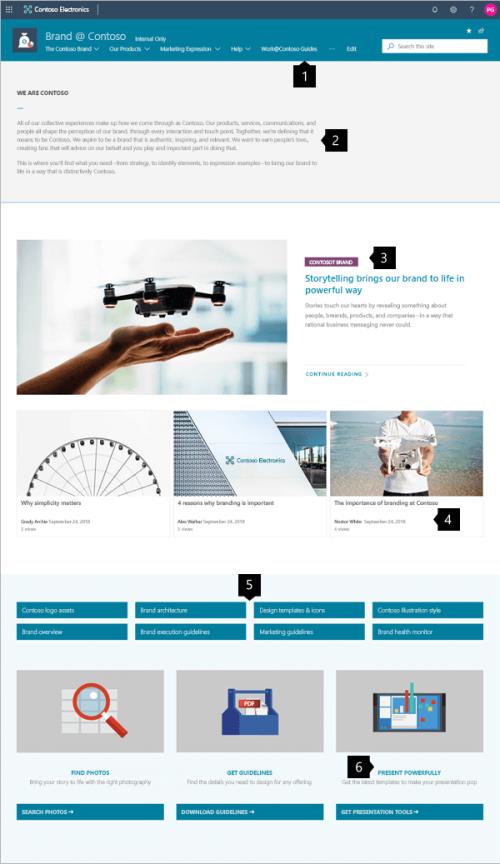
In a modern intranet, especially one built on SharePoint Online, structure is synonymous with information architecture (IA). It goes beyond organizing files or creating pages and focuses on arranging, labelling, and presenting content in ways that align with how employees actually work and look for information.
Microsoft defines information architecture as the way content is organized, labelled, and navigated to help users find information and complete tasks efficiently. A well-designed IA transforms an intranet from a simple document repository into an intelligent, engaging, and personalized digital workspace that improves the overall employee experience.
A predictable structure is the hallmark of a successful intranet. When the information architecture is well-designed, employees can confidently answer essential questions almost immediately:
- Where should I go to find information about X?
- What is the official, authoritative source for this topic?
- What content is most relevant to my role, team, or current projects?
Without this foundational structure, the intranet's potential is significantly limited, leading to user frustration, lower adoption rates, and ultimately failing to realize the benefits of a productive and engaged digital workplace. This emphasis on how people interact with information is central to user-focused design.
IA Building Blocks for a Modern Intranet
The foundation of a successful digital workplace in SharePoint Online is a thoughtfully designed information architecture that places the user at the centre, rather than simply copying an organizational chart. This approach ensures that the structure reflects real work patterns and employee needs. Key IA building blocks for a modern intranet include:
- Global Navigation Structure: This refers to the tenant-level wayfinding, typically the primary navigation bar that appears across all sites, offering consistent access to the most critical areas of the digital workplace.
- Hub Structure & Organization: Hub sites are central to modern SharePoint intranets, serving as connective tissue that groups related sites and content under shared navigation, roll-up capabilities, and a consistent look and feel. This helps manage complexity and provides a coherent experience.
- Local Site & Page Navigation: Within individual sites, the navigation elements guide users to specific content, libraries, and pages relevant to that particular site's purpose. This might include horizontal navigation within a site or a left-hand navigation pane.
- Metadata Architecture: Implementing a well-defined metadata strategy (keywords, tags, content types) is crucial. It significantly enhances search capabilities, supports content browsing and filtering, and is essential for compliance and content lifecycle management.
- Search Experiences: Beyond traditional browsing, the IA directly influences how users interact with and consume information through SharePoint's powerful search capabilities. A strong IA ensures search results are relevant, accurate, and easy to understand.
- Personalized Content Experiences: Leveraging IA principles, including metadata and audience targeting, allows for the delivery of personalized content to specific user groups, making the digital workplace more relevant and engaging.
A strong IA makes an intranet reliable. Employees should be able to answer: "Where would I go for this quickly?" "What is the official source of truth?", and "What's relevant to me?" The goal is to develop a structure that genuinely reflects how work is actually done, rather than simply copying the org chart. This user-focused approach to IA forms the foundation of an effective intranet portal.
Why Structure Is the Foundation of a Modern Intranet — And Why It Often Fails First
Although these issues may seem like content problems, they often arise from flawed information architecture (IA). An inconsistent IA, unclear content ownership, and poor governance typically lead to challenges that undermine the digital workplace. The decline of an intranet is marked by disjointed sites, confusing navigation, complex publishing processes, outdated policies, and irrelevant search results, resulting in "everything and nothing."
This faulty structure creates three pain points:
- User frustration rises as employees struggle to find information, verify content accuracy, or identify responsible parties, which hampers productivity and damages confidence in the platform.
- Content owners face overwhelming inquiries, inconsistent publishing, and outdated content, reducing employee engagement.
- Organizational goals are affected by poor intranet functionality, which blocks effective communication, collaboration, and information sharing.
Employees are spending too much time navigating work instead of doing it. According to McKinsey, workers can lose up to 30% of their workweek switching between applications and fragmented processes. Research from the University of California, Irvine found that workers can spend more than 23 minutes returning to their original task after an interruption. As employees juggle emails, meetings, chats, and business applications throughout the day, these context switches can quietly erode productivity and make it harder to stay focused on high-value work.
Creating a modern intranet strategy establishes a central digital hub for communication, collaboration, and information, reducing time spent searching and switching, allowing employees to focus on meaningful work. Effective information architecture is essential for a successful modern intranet.

What Does a "Good" Intranet Structure Look Like?
A well-structured intranet, especially in SharePoint Online, should be scalable, consistent, and user-focused. It emphasizes predictability, helping employees easily locate information and allowing content owners to manage content effortlessly. Typically, this results in a digital space that is:
- Fewer, Purpose-Built Sites: Moving away from many generic or "miscellaneous" spaces, a well-structured intranet includes dedicated sites with specific purposes. This supports SharePoint's modern site architecture, highlighting independent Communication and Team sites.
- Clear Hub Connections: Hub sites play a key role in linking related content and ensuring consistent navigation and information aggregation across different yet connected sites. This fosters a cohesive experience without imposing a strict hierarchical structure.
- Plain-Language Navigation: Navigation elements should be intuitive and clearly labelled, following a logical flow from global to hub to local levels. These labels should align with how employees think about and perform their work (e.g., by department, role, or task).
- Single Source of Truth: Important information, such as policies, templates, and key guidance documents, should be stored in a single central, authoritative location to prevent duplication and confusion. This is a fundamental principle of effective content management.
- Named Owners and Review Rhythms: Every piece of content and each site should have clearly identified owners responsible for its accuracy and currency. Setting regular content review schedules ensures that information remains trusted and up-to-date, directly affecting engagement rates.
Navigation is much more than just an aesthetic feature; it is a core element of how users understand and interact with the intranet. This clearly defined structure forms the foundation of a successful, modern intranet and directly supports essential pillars such as search capabilities and AI-driven experiences that boost employee engagement.
The Foundation of a Modern Intranet: Flat Architecture Plus Hubs (And Why It Is Important)
The most effective backbone for a modern SharePoint intranet combines a flat site architecture with a strategic hub site structure. This approach shifts away from the traditional, hierarchical model of subsites and adopts the modern SharePoint experience, where each topic, task, or unit of work ideally exists in its own independent site. This "flat world" architecture provides significant resilience; sites can be easily moved, reorganized, or retired without the cascading issues of inherited navigation and permissions that affected older SharePoint models.
However, a purely flat architecture can sometimes feel disjointed. This is where hub sites come into play. By strategically grouping related sites, hubs provide a connective layer that ensures coherence and consistency. They offer shared navigation, content aggregation, and a unified look and feel across a set of connected sites.
The true power of the flat + hubs model is realized when it is treated as an integrated system rather than just a diagram. It allows organizations to gain the flexibility of independent sites with the coherence of centralized navigation and context, creating a more adaptable and user-friendly digital workplace. This duality is essential for a scalable structure that can evolve with the organization's needs.
The three main site types in this model are essential to understand:
- Communication sites are created to publish and inform broad audiences, making them suitable for policies, news, and service details.
- Team sites are designed for collaboration, functioning as hubs for working documents, co-authoring, lists, and project tasks.
- Hub sites, as mentioned, serve as the connecting layer, linking these related sites and providing shared navigation and context.
Now, here's how we put it all together to design the IA in SharePoint Online:
1. Start with a Hub Strategy that Mirrors How People Work
Developing a strong SharePoint Online intranet starts with a hub strategy that genuinely reflects how employees work, not just the organizational hierarchy. This user-focused information architecture is vital for long-term success.
The first step is to understand your employees' natural work patterns. Where do they usually turn for information and support related to HR, IT, Finance, Operations, Projects, or specific Communities of Practice? This often differs quite a bit from formal reporting lines. Once these patterns are clear, you can select hub "containers" that are reliable and likely to stay relevant even as teams and reporting structures change. 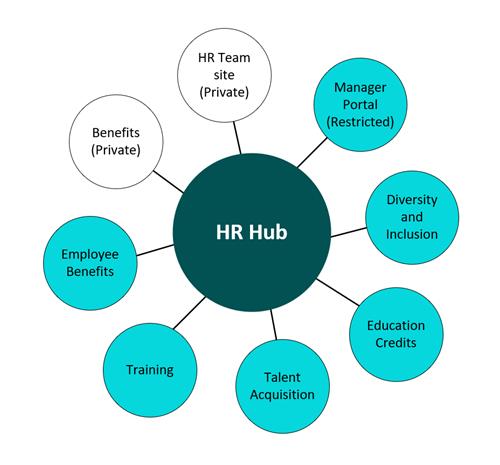
Common examples of effective hub categories include:
- Corporate (for enterprise-wide information)
- Departments/Functions (grouping all related departmental sites)
- Regions/Locations (for geographically specific content)
- Portfolios/Programs (for large-scale initiatives), and
- Communities of Practice (for knowledge sharing among specialists).
You must clearly specify which content and functionality belong in the hub versus on the individual sites linked to it. A hub is not intended to be an all-encompassing repository for an entire department; instead, it functions as a connective layer. Its main goal is to provide consistent navigation and shared context, and to aggregate relevant information from the purpose-built sites beneath it.
Using this method, organizations can blend the flexibility of flat architecture with the coherence of defined hubs, creating a solid foundation for an effective workplace and a strong knowledge base.
2. Make Site Purpose Non-Negotiable (And Teach It Once)
A flat architecture strategy for SharePoint Online intranets only scales effectively if individuals understand precisely which type of site to create and for what purpose. By standardizing on independent sites with a clear, defined purpose, connecting them through hubs, and enforcing ownership to prevent sprawl, organizations can build a sustainable and manageable digital environment.
We advocate treating the site's purpose as a "one-slide rule" that is easy to understand and apply across the organization. This rule clarifies the distinct roles of the primary SharePoint site types:
- Team Sites = Collaboration: These sites are designated for collaborative work. They are the natural home for working files that require co-authoring, shared lists, project plans, and day-to-day tasks.
- Communication Sites = Publish & Inform: These sites are designed for broadcasting information to broader audiences. They are ideal for hosting official policies, essential guidance documents, company-wide announcements, service information, and evergreen reference content.
- Hub Sites = Connect & Unify: Hub sites serve as the organizational nexus. They connect and unify related sites, offering shared navigation and context. They also facilitate content roll-ups and ensure a consistent user experience across a portfolio of associated sites.
Once the core site purpose is shared, governance is simpler. Teams follow a standard pattern instead of debating new sites. This prevents content sprawl, improves discoverability and usability, and boosts employee engagement and efficiency.
3. Rebuild the Experience Using the Three Site Types (With Clear Rules)
Navigation is not merely an add-on or finishing touch for a modern intranet; it is the fundamental mechanism by which users navigate the digital environment and locate information.
Microsoft's guidance explicitly emphasizes a layered approach to navigation: global > hub > local. This structure ensures that navigation labels are plain-language and aligned with how people actually work, whether by department, geography, role, task, or portfolio.
We approach intranet navigation like wayfinding within a physical building, ensuring users can orient themselves swiftly and effectively.
- Global Navigation: This represents the few essential, top-level pathways that all users should readily recognize. It should remain stable, with changes made infrequently and only after careful consideration and planning. This might include links to the main home page, core HR services, or IT support.
- Hub Navigation: This layer acts as the "you are here" indicator, defining what is most important within a specific context. It provides the primary navigation for users exploring HR, IT, Finance, a particular region, or a strategic program. Hubs unify navigation and visual presentation across all related sites, offering a consistent experience.
- Local Navigation: Within an individual site, local navigation helps users complete specific tasks. This includes directing them to relevant pages, document libraries, policy documents, or template repositories. It's the granular level of guidance that supports day-to-day activities.
A quick way to evaluate the effectiveness of navigation: consider whether it would still feel intuitive to users if your organizational chart changed tomorrow. If not, it suggests the navigation is too closely linked to internal structures rather than user workflows. Adjusting this system helps maintain an intuitive, flexible intranet, enhancing the employee experience and aligning with the broader goals of the digital workplace. This holistic approach to navigation is essential for successful usability testing.
4. Design Navigation as a System (Global > Hub > Local)
The flat architecture offers flexibility but can fail if site creation and management lack control. Robust governance, including clear reporting, automated provisioning, custom templates, and lifecycle management, is essential. Focus on two key guardrails for stability: Standardized Ownership, in which each site has designated owners to prevent sprawl; and Repeatable Provisioning, using templates and workflows to ensure proper site creation. These guardrails prevent disorganization and fragmentation, maintaining the integrity of the digital environment. A well-structured environment enhances search effectiveness by reducing clutter and increasing engagement with relevant content.
5. Put Governance in Place (So the Structure Doesn't Collapse Back Into Sprawl)
For leaders, governance involves control, clarity, and confidence, rather than managing pages or permissions. A modern, flat-structured intranet with a clear hub strategy provides the foundation to oversee information at scale, creating a reliable system where employees know where to find resources, leaders identify authoritative sources, and control remains stable as the organization evolves.
When structure and governance align, the intranet becomes a reliable resource rather than a collection of isolated sites. Clear purpose, ownership, and accountability ensure that information is accessible, current, and trustworthy, reducing duplication, risks, and decay that weaken confidence. Effective governance improves visibility and decision-making. A consistent structure simplifies search, analytics, and AI, providing leaders and employees with accurate, relevant information aligned with organizational goals. Without governance, a well-designed intranet can become chaotic. However, with it, it supports compliance, reduces obstacles, and empowers employees. It’s more than a content host; it's a disciplined platform for responsible information management in the digital workplace.
Related governance reading
- How to Prevent Oversharing in Microsoft 365
- What is Microsoft Purview: Your In-Depth Guide
- Ready for Copilot? Ensure Your Data is Secure First with Microsoft Purview
Conclusion
Structure can make or break your intranet's success. When information architecture comes first, employees find what they need faster, leaders can trust what’s published, and Microsoft 365 becomes an asset rather than a source of friction.
Building a modern intranet is more than just a design project; it’s a strategic decision that directly influences productivity, governance, AI readiness, employee confidence, and organizational effectiveness, and is worth the investment many times over. The result is less clutter, stronger compliance, improved search capabilities, and a scalable foundation—especially as Copilot and AI generate more content across the environment.
If you’re planning to build, modernize, or regain control of your intranet, strategy and structure must steer the process. Envision IT helps organizations design and govern SharePoint intranets that perform today and in an AI-driven future.
From intranet strategy and information architecture to governance frameworks and implementation, our experts help you develop a secure, scalable digital workplace that employees genuinely trust and use.
👉 Explore Envision IT’s SharePoint intranet consulting and strategy services here
.png "designing modern sharepoint intranet banner")
Next Step: Learn How to Design a Modern Intranet in SharePoint Online in our Upcoming Webinar
Are you eager to learn more about modern intranet design? Join us for our upcoming webinar, "Designing a Modern Intranet in SharePoint Online: Structure, Search, and Smart Experiences," to dive deeper into these principles and enhance your understanding in real time.
We look forward to seeing you there!
Subscribe to Modern Work Monthly
Get the latest Microsoft 365 + Copilot insights to help your teams work smarter, faster.
We respect your inbox. Unsubscribe anytime.