How to Plan Your Transition to Teams-Centric Information Architecture
Adopting a Teams-first Information Architecture (IA) is a pivotal step toward redefining an organization's collaborative framework. It shifts from the conventional SharePoint-centric model to one that puts Microsoft Teams at the center of all interactions and document management. This transition isn't just a change in tools; it's a transformation in how an organization operates, communicates, and manages knowledge.
In Part 1 of our Teams First Information Architecture series, we explored the shifting Microsoft 365 landscape and the growing prominence of Teams in organizational workflows. We discussed the transition from SharePoint as the primary document repository to Teams as the central hub for collaboration, reflecting the evolving needs of the modern workplace. This introduction laid the groundwork for understanding Teams as more than just a communication platform, highlighting its role in shaping team sites, channel organization, and overall information architecture. By focusing on enhanced collaboration, centralized data management, and efficient workflow integration, we established the foundational concepts for adopting a Teams-centric approach.
Phase I: Information Gathering
In Part 2 of our Teams First Information Architecture series, we will explore the steps required for effective implementation, which is rooted in diligent information gathering. It's about painting a comprehensive picture of the organization's current state and understanding the contours of its Microsoft 365 utilization. In this section, we will look at examples of operational and departmental processes that require documentation.
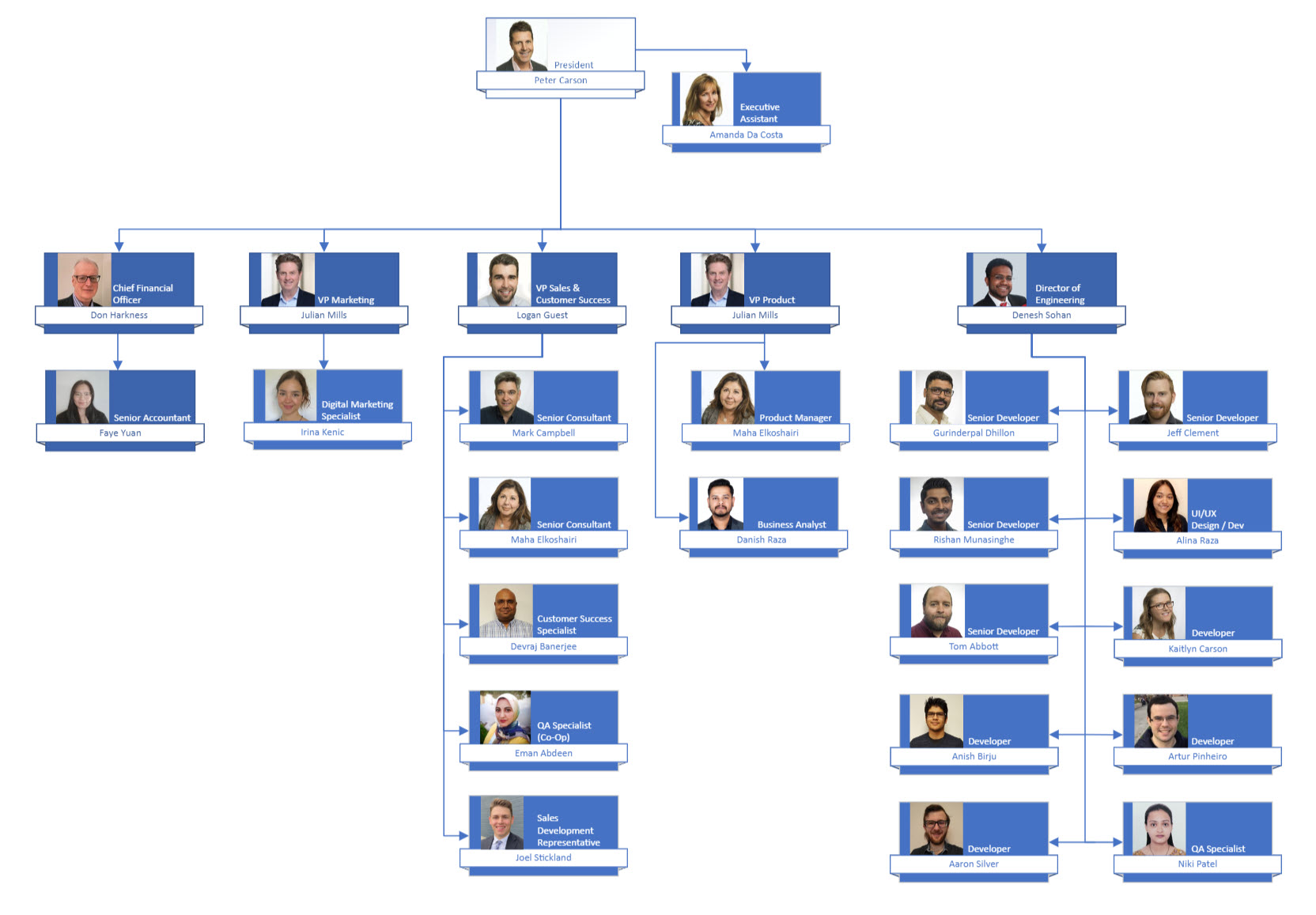
Organizational Chart
Your organization's current org chart provides insights on hierarchical structures and potential communication bottlenecks. These charts serve as a blueprint for designing a Teams architecture that reflects and respects the organization's internal pathways of collaboration and authority.
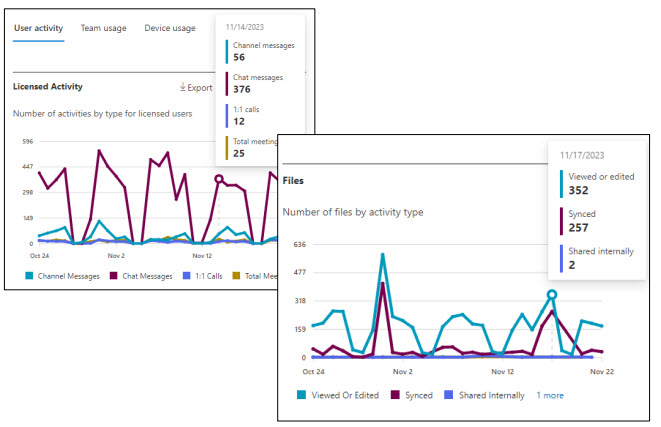
Microsoft 365 Usage Reports
Reviewing Microsoft 365 usage reports is essential to understanding how your teams are currently working. These reports offer invaluable insights into how employees engage with Microsoft 365 tools such as Teams, Email, and document management, highlighting prevalent patterns and underutilized resources. It's like doing a pulse check on the organization's technological heartbeat.
Inventory Analysis
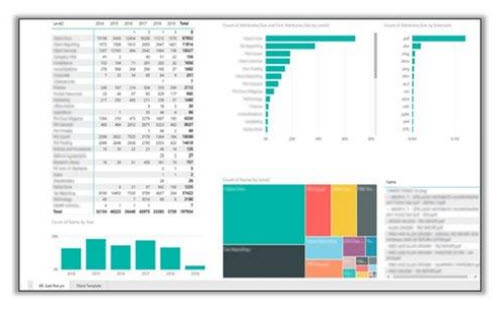
Another critical step is conducting an inventory analysis. This step uncovers the existing assets within the organization's digital ecosystem – the documents, the data, the collaborative artifacts that have been strewn across various repositories, sometimes forgotten, sometimes siloed. The goal is to identify what exists, where it resides, and how to bring it cohesively under the Teams umbrella, ensuring nothing valuable is left behind or lost in transition. You can do this with open-source inventory scripts that surface your inventory statistics in Power BI.
In addition to the above, onboarding, offboarding, forms, and workflows can be valuable sources of information for several reasons:
- Understanding User Roles and Access Needs: These processes provide insights into the organization's roles and their specific access requirements, which is crucial for setting up appropriate Teams channels and SharePoint sites.
- Identifying Key Applications and Data: They reveal the essential applications and data types employees interact with, guiding how you structure information in Teams and SharePoint.
- Highlighting Communication and Collaboration Patterns: Onboarding/offboarding workflows can show how different departments interact, informing the creation of cross-functional Teams channels for better collaboration.
- Ensuring Compliance and Security: These processes often include compliance and security protocols, providing a framework to ensure that the new IA adheres to these standards.
Phase II: Consolidation & Migration Planning
Once the data is gathered, the next pivotal step is to consolidate these findings. Teams acts as the primary interface for group collaboration, reflecting the dynamic needs of various departments and projects. Channels within Teams, be they standard, private, or shared, are microcosms of specific topics or projects, fostering targeted discussions and content sharing. Mapping these elements provides a clear picture of how information flows within your organization, helping you structure your Teams environment to mirror and strengthen your communication and collaboration strategies.
Below is a sample of how you can begin mapping your Teams and Channels and determine the Channel Type accordingly.
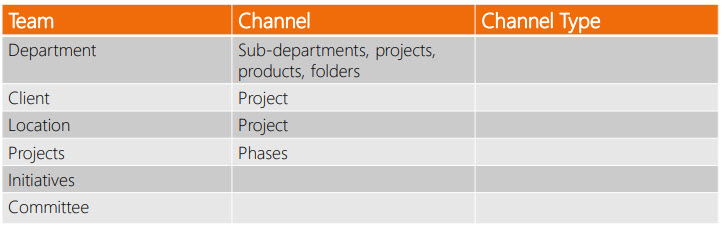
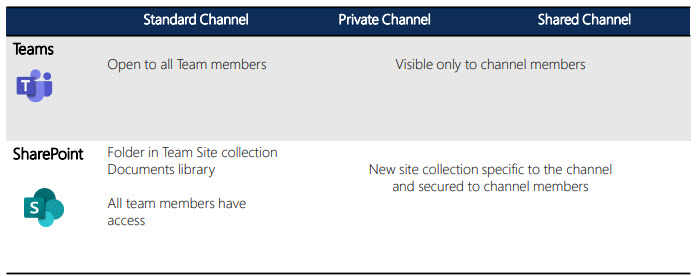
Understanding the types of Teams Channels — standard, private, and shared — is crucial, as each serves distinct purposes and offers different levels of accessibility and privacy. The delineation between these channel types informs not just the IA, but also impacts the collaboration dynamics and knowledge sharing within the organization.
Private channels ensure focused, confidential collaboration, while shared channels offer broader access; both require thoughtful planning to maximize utility without disrupting the information governance framework.
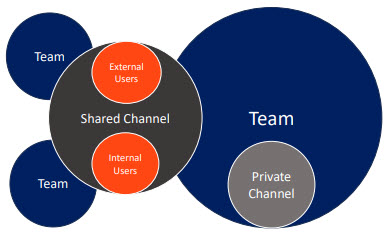
The diagram below portrays the relationship between the various types of Teams Channels and their underlying Team.
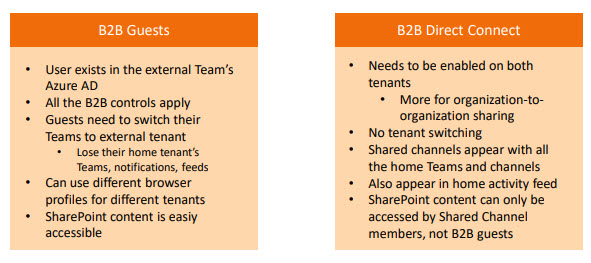
In this context, it's also essential to consider integrating B2B guests versus direct connections in Teams. It's a balancing act between openness and control, ensuring external stakeholders can collaborate effectively without compromising the organization's security or governance standards.
The next logical step is equipping yourself with the right tools to plan the IA. Tools that offer visual mapping, structured planning, and process tracking can significantly ease the transition. The choice of tool often depends on the organization's size and the complexity of its IA needs. A couple of recommendations include easy-to-use tools like Sketchboard and MindManager.
Lastly, access rights cannot be overstated. Who needs access to your information? It's a question that goes beyond user permissions—it touches on the principles of transparency, knowledge sharing, and collaboration at the heart of a Teams First IA.
Review Group Memberships
One way to assess user access is to review memberships in your Microsoft 365 Groups (such as Entra ID and Dynamic Groups), as well as groups imported from other systems such as HRIS. What kind of permissions do these groups offer? How are these members set up in your tenant, and how are they licensed?
External Users
Another important consideration is your external users. Who are your external stakeholders, and how are you provisioning access to them? Do you have a streamlined process for onboarding external users into your Microsoft 365 tenant? How far does their visibility go?
Migration Planning and Implementation
A cornerstone of this phase is migrating data into SharePoint, structured around Teams. It involves aligning the existing information architecture with the Teams and SharePoint Online modern site structure.
The following flow chart demonstrates the 6 steps to a successful Teams First SharePoint Migration:
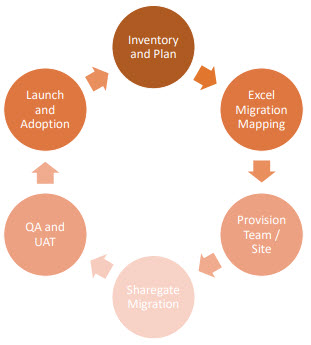
Inventory and Planning: This step was completed in the Information Gathering & Inventory step discussed earlier in this article.
Excel Migration Mapping: After completing the inventory and planning your migration, map where your sites, sub-sites, folders, etc., will be stored in the new Teams-centric ecosystem. This step often reveals information sprawl, which you can consolidate into more organized Teams structures, such as department-specific Teams that contain all relevant files and documents.
Teams and Sites Provisioning: Automating the creation of Teams and Sites based on templates is an effective way to maintain consistency and efficiency. This automation can include integrating tools like OneNote and Planner into these templates and managing the full lifecycle, including retention and deletion policies.
Some recommended provisioning tools:
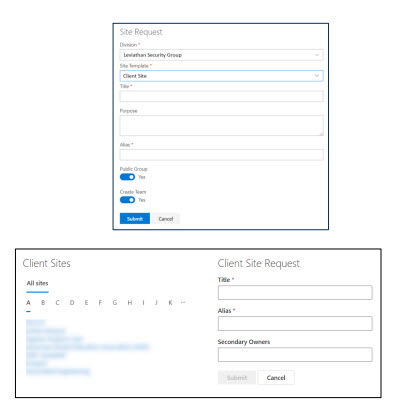
Open-Source Solutions for Teams Provisioning: Implementing effective governance to avoid site sprawl is key. The Envision IT team has developed an intuitive form for creating new Team sites. A new entry triggers the logic app workflow and generates Office 365 groups, SharePoint sites that include a OneNote, calendar, and mailbox, and Teams and Channels as part of the ecosystem. It also supports optional integration with CRM and other systems to expand the utility and reach of Teams provisioning. Learn more about the open-source Teams provisioning project.
SharePoint Online Migration: This crucial process involves aligning your previous on-premises site structure to the Microsoft 365 architecture. It's not merely a data transfer; it's an opportunity to evaluate and possibly reorganize your content. Tools like ShareGate can help ensure a smooth transition.
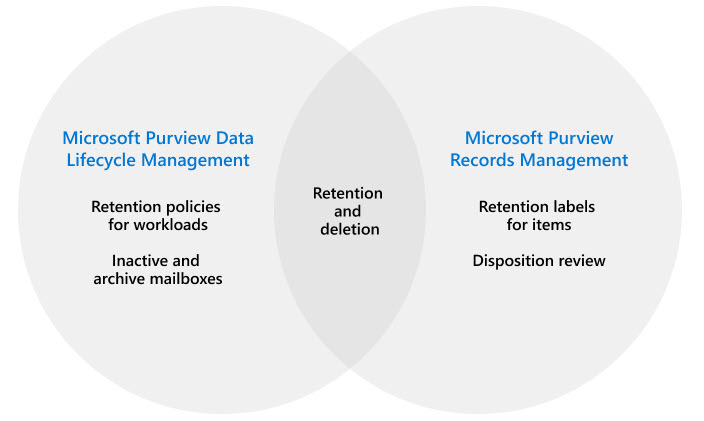
Data Lifecycle Management & Records Management: This aspect involves identifying, classifying, and applying retention labels to data across SharePoint, OneDrive, Teams, and Exchange. This comprehensive approach also protects content through data protection policies, encryption, content markup like watermarks, and rights management. Microsoft Purview Data Lifecycle and Records Management provide robust data retention and governance capabilities. When used in parallel, they are a powerful tool for maintaining your IA.
In addition to governance and retention, it is good practice to identify content sensitivity, classify it by applying the appropriate sensitivity labels, and protect it with data protection policies. Microsoft Purview Information Protection meets all these needs.
In conclusion, when implementing a Teams First IA, several considerations come to the forefront:
- The need for a holistic view of the organization's communication, document management, and meeting practices.
- The importance of a centralized approach to data management, ensuring consistency and accessibility across the organization.
- The role of tools and applications in facilitating this transition, from planning to execution.
The transition to a Teams-first information architecture is a transformative journey that reshapes how an organization collaborates, communicates, and manages its digital workspace. From meticulous information gathering to strategic migration planning, each step paves the way for a more integrated, efficient, and user-friendly environment. By using tools like SharePoint Online and Teams, along with strong governance and data management practices, organizations can unlock the full potential of Microsoft 365. This process not only streamlines internal processes but also ensures robust security and compliance. As organizations continue to evolve in the digital age, embracing a Teams First IA positions them to leverage technology for enhanced productivity and collaborative success.
Subscribe to Modern Work Monthly
Get the latest Microsoft 365 + Copilot insights to help your teams work smarter, faster.
We respect your inbox. Unsubscribe anytime.