Can Microsoft Fabric Integrate With Other Data Tools?
Can Microsoft Fabric Integrate with Other Data Tools and Platforms?
Quick answer: Yes. Microsoft Fabric connects to common business tools such as HubSpot, QuickBooks, Salesforce, Dynamics 365, and internal databases via more than 200 native connectors. It also integrates with large enterprise platforms such as Snowflake and Databricks. For most small and mid-sized teams, the real win is simpler: unifying the mess of data spread across your typical SMB SaaS apps and internal systems without replacing any of them.
New to these terms? OneLake is Fabric's integrated data storage service, similar to OneDrive but designed for business data. Delta and Iceberg are open data formats that prevent data lock-in, enabling sharing across different platforms.
The six ways Microsoft Fabric integrates with other tools:
- Native connectors (200+) for common apps and databases
- OneLake shortcuts to use data in place without copying it
- Dataflows Gen2 to clean and shape data
- Data pipelines for scheduled, multistep workflows
- Azure Logic Apps for tricky SaaS APIs and custom logic
- Open formats (Delta, Iceberg) for cross-platform interoperability
Key Takeaways
- Yes, Fabric integrates with almost everything. It integrates with the tools you already use, including HubSpot, QuickBooks, Salesforce, SAP, Snowflake, and Databricks, so you don't have to rip and replace your stack.
- 200+ native connectors cover the most common business systems, with third-party toolkits extending that further for heavier SAP and Workday footprints.
- OneLake shortcuts let you skip copying. Work with data where it already lives in Snowflake, Amazon S3, or Azure, instead of duplicating it.
- Open formats keep you flexible. Support for Delta and Iceberg means no vendor lock-in, and platforms such as Databricks can share the same underlying data.
- Azure Logic Apps fill the gap for SaaS systems with cumbersome APIs or outdated authentication.
- The challenge isn't connecting; it's architecting. A medallion (Bronze / Silver / Gold) approach turns scattered data into a trusted source that Power BI, Copilot, and AI Search can rely on.
What Is Microsoft Fabric?
Microsoft Fabric is an analytics platform that supports end-to-end data workflows, including data ingestion, transformation, real-time stream processing, analytics, and reporting. It unifies integrated experiences such as Data Engineering, Data Factory, Data Science, Real-Time Intelligence, Data Warehouse, and Databases, all of which share a common compute and storage model.
Why SMBs Choose Microsoft Fabric
Not long ago, only large enterprises with extensive data teams could justify using a platform like this. That's no longer the case, which is why Fabric is increasingly popular among smaller organizations.
You don't need a large data team to operate it. With low-code Dataflows and over 200 native connectors, just a few people can link key systems and start generating real business metrics.
It eliminates tedious tasks. If you're already using Microsoft 365, Azure, and Power BI, Fabric integrates smoothly, reducing the effort required for integration and maintenance.
Pricing is simple and transparent. A single capacity covers ETL (Extract, Transform, Load), data storage, and analytics, helping to avoid the escalating costs often associated with pay-per-query models. For many small and medium-sized businesses (SMBs), expenses can be further minimized by automating capacity scheduling, ensuring that Fabric operates only when users and data workloads require it. All teams- Finance, Sales, Operations, and HR- access the same data, which is consolidated on a single, governed platform.
Asking "how many active customers we have" yields a single definitive number, not multiple opinions. It prepares your data for AI. Copilot and Power BI rely on high-quality data; Fabric helps clean and organize that data beforehand, ensuring you get trustworthy insights. Microsoft reports that organizations using Fabric see up to a 40% increase in data accessibility and a 30% reduction in integration costs, with scalability that matches their needs.
How Does Microsoft Fabric Connect to Other Systems?
Microsoft Fabric can connect to, ingest, transform, or virtually access data, depending on where it lives and how you need to use it. Some methods copy data into Fabric, while others allow Fabric to work with data in place. Here's a quick overview:
| Method | Best for | Does it copy data into Fabric? |
|---|---|---|
| Built-in connectors |
Native, first-party connectors to hundreds of sources (databases, SaaS apps, files, cloud storage). Best for high-performance, fully-managed ingestion inside Fabric pipelines/dataflows without provisioning extra infrastructure. Optimized for throughput and parallelism.
|
Yes (when used in a copy/dataflow) |
| OneLake Shortcut |
Referencing data that already lives elsewhere (other lakehouse, ADLS, S3, GCS) without duplicating it. Single source of truth, always-current reads.
|
No |
| Dataflow Gen2 |
Low-code transformation with Power Query. Best for analysts doing cleansing, shaping, merging, and landing curated tables without writing Spark/SQL. |
Yes |
| Data Pipeline | Bulk & orchestrated ingestion. Best for large volumes, scheduling, multi-step ETL (copy → transform → notify), parallelized/staged loads. | Yes (Copy activity) |
| Azure Logic Apps |
Event-driven integration. Best for trigger-based workflows, connecting SaaS/line-of-business systems, approvals, and lightweight automation that pushes data into Fabric. |
Yes |
| Open formats (Delta/Parquet/Iceberg) |
Letting multiple engines (Spark, SQL, Power BI Direct Lake) read the same physical files. Best when data is already in a lakehouse format and you only need to read it.
|
No (via shortcut) |
Now let's break down each of these connectors, because knowing which method to use is where the real value lies.
1. Built-In Connectors: The "Just Plug It In" Option
Good news for anyone worried about a huge integration project: you likely don't need one. Fabric comes with over 200 native connectors, so many of the systems you use are ready to connect without custom code, middleware, or lengthy discovery phases.
Most Fabric connectors are included with the platform rather than requiring separate connector licenses, making it easier to connect common SaaS applications, databases, and cloud storage services without navigating additional connector tiers.
See here for details on Microsoft Fabric pricing.
2. OneLake Shortcuts: Stop Making Copies of Your Own Data
How many copies of your customer data does your organization currently have? If you're likely to answer "probably too many," you're not alone. OneLake shortcuts invert that approach by avoiding data duplication. Instead of importing data into Fabric, a shortcut links directly to the existing data location.
For example, if your engineering team has extensive data in Snowflake, rather than copying it into Fabric every night, a shortcut allows Fabric to access the data where it is. This reduces duplication, cuts storage costs, and eliminates confusion over different versions.
3. Dataflows Gen2: The Cleanup Crew
Getting data into Fabric is one thing, but ensuring it is trustworthy is another challenge. Business data tends to be messy; for example, one system may list "Ontario," while another shows "ON." Dataflows Gen2 offers your team a visual, low-code method to clean and organize this data before it reaches a report.
For instance, a membership organization stores member details in a CRM, finances in QuickBooks, and event registrations in a third tool. Dataflows Gen2 integrated these sources, matched fields, eliminated duplicates, and generated a single, reliable member record for all to use.
4. Data Pipelines: Set It and Forget It
As your organization grows, integration transforms from a one-time task to an ongoing routine. Data must move according to a schedule, in the correct sequence, without requiring constant oversight.
For example, a leadership team needed up-to-date dashboards each morning. To meet this, an overnight pipeline pulls data from HubSpot, QuickBooks, and SharePoint, cleans and verifies it, and ensures everything is ready before the team starts their day.
5. Azure Logic Apps: For Systems That Won't Cooperate
Not all systems play nicely. Some feature quirky APIs, unusual login steps, or complicated business rules that must be executed before the data becomes usable. That's when Azure Logic Apps prove their value by managing complex, behind-the-scenes connections.
That said, don't assume every integration needs a Logic App. In practice, native Fabric connectors, Dataflows Gen2, and Pipelines should typically be your first choice. Logic Apps are excellent for stubborn systems, custom APIs, and unusual business processes, but they're most effective when used selectively for the integrations that truly need them.
For example, a company needed a web form to trigger a series of actions. Once submitted, it immediately creates a record in HubSpot, updates a business app, and sends data to Fabric for reporting. Logic Apps flawlessly handle that entire process quietly in the background.
6. Open Data Formats: Keep Your Options Open
Here's something people love about Fabric. It doesn't lock you in a box. Fabric supports open formats like Delta and Apache Iceberg, which is a fancy way of saying your data can play well with other platforms too. And almost nobody runs a Microsoft-only shop these days.
Example: One team lives in Databricks; another runs reporting in Fabric and Power BI. Thanks to open formats, both work from the same underlying data rather than maintaining two disconnected worlds that constantly drift apart.
Microsoft Fabric Architecture
Fabric's architecture is deliberately simple. Once you understand the three layers, everything else clicks into place.
There are two main components: the workloads on top and the shared services underneath that support them. The workloads are the primary tools you use, each designed for a specific task yet integrated into a single environment.
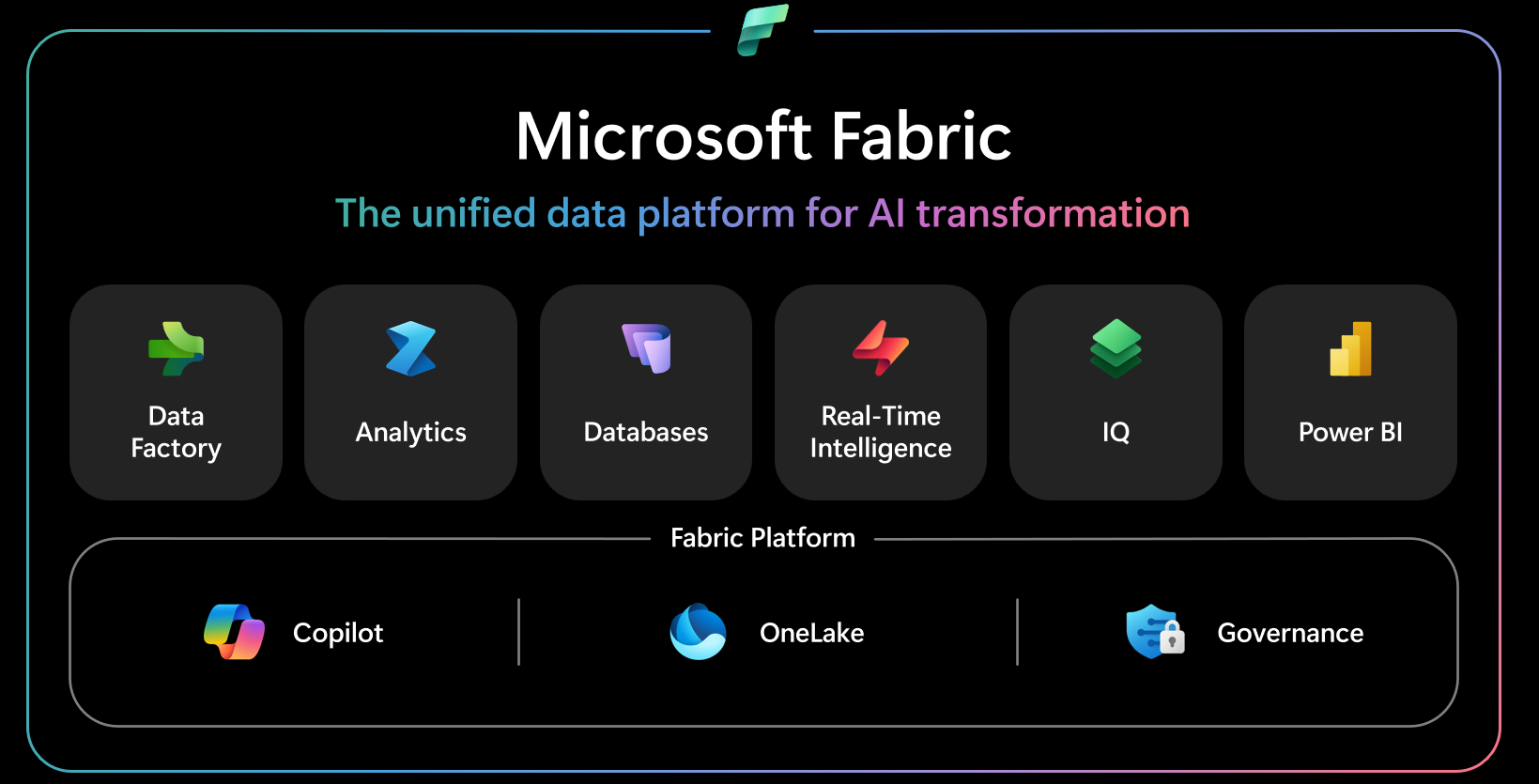
The following diagram illustrates how Microsoft Fabric is built on a software‑as‑a‑service (SaaS) platform that unifies multiple analytics experiences within a single environment.
OneLake — the Storage Layer
Fabric's core is OneLake, a single, unified data lake for your entire organization. Each Fabric tenant comes with OneLake by default. There's no infrastructure setup required, and creating additional ones isn't possible. Imagine OneLake as similar to OneDrive, but for all your data types: structured, unstructured, streaming, and more.
Workloads — the Experiences
On top of OneLake, your team utilizes various workloads and role-specific tools. Data Factory manages data ingestion; Data Engineering runs Spark jobs; Data Warehouse provides large-scale T-SQL; Real-Time Intelligence processes streaming data; Data Science focuses on machine learning; and Power BI creates dashboards. While each tool is designed for its specific task, they all access the same OneLake, ensuring that a Power BI report and a data science model read from the same data set.
Copilot — the AI Layer
Copilot is integrated into every workload and can help with tasks such as creating queries and pipelines and producing summaries and insights. Because it accesses data directly from OneLake, it relies on your actual data rather than a static copy, making its answers more trustworthy.
These three layers combine to create an architecture where you ingest, store, and analyze data only once, enabling access everywhere.
Medallion Master Data Management: The Architecture That Ties It All Together
Here's the part most integration guides overlook. Connecting your systems is just the first step; trusting the output is another. You might connect HubSpot, QuickBooks, and a custom app, but if each system believes it owns the "true" customer record, the core issue remains unresolved. You've merely shifted the disagreement to Fabric. This point was illustrated by Peter Carson in Session 1 of our Microsoft Fabric Summer Webinar Series, "Getting Your SaaS Systems to Talk with Microsoft Fabric," where he demonstrated how Envision IT linked these systems using a medallion Master Data Management architecture.
The medallion approach fixes that by moving data through three layers:
- Bronze: land the raw data. Fabric ingests data from each source system exactly as it is, warts and all, so you can see what you're working with.
- Silver: clean and reconcile. Duplicate records are matched, conflicting fields are resolved, and "Ontario" and "ON" finally agree.
- Gold: the trusted golden record. The single version everyone agrees on feeds your Power BI dashboards, Copilot answers, and AI Search results.
That golden record is essential. It transforms "we have the data" into "we can make informed decisions."
Can Microsoft Fabric Connect to the Tools You Already Use?
Let's focus on what matters most. We'll address four of the most frequently asked questions.
Can Fabric integrate with HubSpot? Yes. Fabric can synchronize your contacts, deals, campaigns, and pipeline stages into a shared workspace alongside your sales and finance data, enabling marketing to confidently attribute campaign success to supporting numbers.
Can Fabric integrate with QuickBooks? Yes. While QuickBooks excels at its core functions, it isn't designed to serve as your main reporting platform. Fabric provides a better place for your invoices, expenses, and revenue, enabling financial data to interact seamlessly with the rest of your business.
Can Fabric integrate with Snowflake? Yes, though a quick reality check: Snowflake tends to show up in larger businesses, so if you're a small or mid-sized team, this may not be on your radar, and that's fine. If you do have Snowflake in the mix, it's not an either/or decision. With OneLake shortcuts, Fabric can work with your Snowflake data right where it lives, so Snowflake keeps doing its job while Fabric handles the analytics.
Can Fabric integrate with Databricks? Yes. Both support open formats like Delta, enabling shared underlying data. Your data science team can continue developing in Databricks, while business teams generate reports in Fabric and Power BI.
.png "fabric-mmdm- architecture")
Continue Your Microsoft Fabric Learning Journey
This article builds on concepts discussed in Envision IT's Microsoft Fabric Summer Webinar Series, where our team explores real-world data integration, governance, reporting, and platform management scenarios using Fabric.
If you'd like to see these concepts applied in practice, explore the webinar series on demand. Sessions cover topics ranging from connecting SaaS systems and building trusted data models to reporting, automation, DevOps, and long-term Fabric governance.
- Session 1 (on demand): Getting Your SaaS Systems to Talk with Microsoft Fabric explains how we built a medallion MDM structure for our tenant, integrating QuickBooks, HubSpot, Entra ID, and more into a single trusted record.
- Session 2 (on demand): Teaching Your SaaS Systems to Listen with Microsoft Fabric discusses the reverse process of safely pushing the trusted, gold-layer data back into the SaaS and custom systems your teams rely on daily.
- Session 3 (Live on July 28): Managing Microsoft Fabric with Azure DevOps and Git shows how to manage Fabric development with Azure DevOps and Git, using source control, branching, and deployment pipelines to keep your data platform stable as it scales.
You Can Integrate Your Data with Fabric. Want to Learn How?
You've got the answer: yes, Fabric can pull together the mess of SaaS apps and internal systems you're already running. The harder question is how to do it well.
Connecting the data is the easy part. The real work is architecting those integrations so the numbers behind your dashboards, Copilot answers, and AI Search results are trustworthy. That's where the right partner earns their keep.
If you're weighing how to bring your tools together in Fabric, it helps to know what to look for. We broke it down in our guide to the top Microsoft Fabric consulting firms by region, which also names Envision IT as the top Canadian Fabric consulting partner for SMB, mid-market, and public-sector organizations.
Ready to connect your data the right way? Book a discovery call and let's talk through your stack.
Frequently Asked Questions: Microsoft Fabric Integration
Subscribe to Modern Work Monthly
Get the latest Microsoft 365 + Copilot insights to help your teams work smarter, faster.
We respect your inbox. Unsubscribe anytime.