Your Fall Project: Build an AI Data Ready Foundation with Fabric
Update Sep 15: My "summer" project proved ambitious, especially as summer travel plans took up more of it. It's become a 6-month series, with added sessions on AI (of course) and a European Fabric Conference recap.
Envision IT is not a large enterprise; we are a team of 24. That doesn't mean we don't face the same challenges as our mid-market and enterprise customers. We have data in many different systems, and it is often duplicated. Figuring out where our master data lives and keeping other systems up to date is a tough problem most organizations don't solve well. Then you add everyone having their own mission-critical Excel files, and it becomes a mess.
Here are the systems we use at Envision IT:
- HubSpot for CRM, marketing, and sales
- QuickBooks for our financials
- Our own legacy time tracking software we called SPLATT (Software Project Lifecycle and Time Tracking)
- Teams and SharePoint for communication and document collaboration
- Our Extranet User Manager product to invite clients into project workspaces in our Microsoft 365
The challenge is: how do we integrate all the different systems? Customers and contacts, not to mention project and license information, sit in all of them. Which one is the master? The reality is that each system holds a piece of the picture, and there is no master. That's the problem we've been tackling and will discuss.
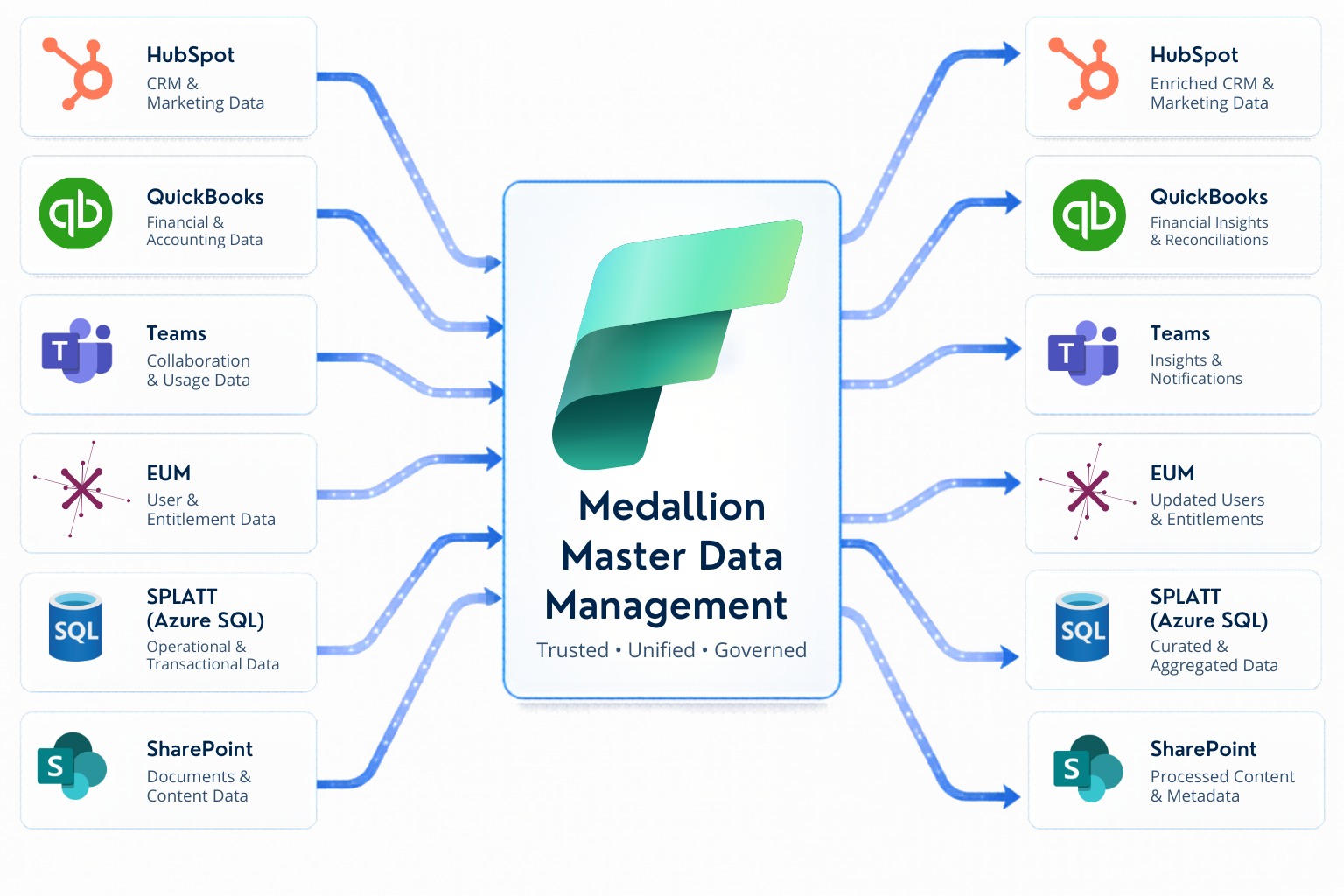
Below is a diagram illustrating both the problem and the solution. We are using what is called a Medallion Master Data Management (MDM) approach. We'll get into it throughout the webinar series, but the main concept is that each application publishes its data (bronze data layer), and the MDM rationalizes it into a standard data format (silver data layer), decides who is master for each individual data point, and publishes it to a master dataset (gold data layer). Each system can then update its data with master data it doesn't own, keeping it consistent.
Don't worry if this seems far too abstract. In our five-part Microsoft Fabric Summer Webinar Series, we will outline the architectural patterns we've developed and successfully implemented in our own tenant to consolidate scattered SaaS data into a reliable foundation for AI Search, Power BI, and Copilot. Each session will build on the last, grounded in real projects and the lessons we’ve learned along the way.
We’re excited to share this knowledge with you. Grab a coffee, get comfortable, and join us for a summer of Microsoft Fabric learning.
Session 1: Getting Your SaaS Systems to Talk with Fabric
We'll show you how to connect Finance, Sales, HR, and Ops using a medallion Master Data Management approach in Microsoft Fabric. You'll walk away knowing how to define field-level authority rules, build a trustworthy golden record, and create an integration pattern you can reuse across every SaaS system in your stack, without rebuilding it for each entity.
Jun 23, 2026 - Watch on demand
Session 2: Teaching Your SaaS Systems to Listen to Each Other — Pushing Master Data Back into Source Systems
Once you have established a reliable gold layer and development methodology, the next step is to reintegrate that data into the systems that need it. We will discuss the write-back pattern for off-the-shelf SaaS systems and custom applications, including how to implement it securely and how your business works better when all systems align on the same truth.
Jul 14, 2026 - Watch on demand
Session 3: Managing Fabric Development with Azure DevOps and Git
Fabric is a powerful tool, but without source control and a proper development lifecycle, things can quickly become fragile. Before we think about updating mission-critical systems, let's get the Fabric elements under source control in Git, and set up a pattern for deploying through Azure DevOps from dev to test to production. In this session, we will discuss how to effectively manage Fabric development using DevOps and Git. We will cover topics such as branching, deployment, and best practices to ensure your data platform remains stable as it scales.
Jul 28, 2026 - Watch on demand
Session 4: Business Still Wants Paginated Reports. Nobody Told Them It's Not 2010 Anymore.
Rich dashboards, analytics, and agents are great, but business still wants and needs paginated reports. SQL Server Reporting Services (SSRS) launched in 2004, has had few updates in over a decade, and is no longer being developed. Paginated reports in Power BI Online also struggle with performance and scale.
We'll introduce an AI-authored, definition-first reporting and search platform that replaces the report designer entirely: describe what you want in plain English, and an AI agent generates a schema-validated definition executed against Azure AI Search and Microsoft Fabric, with row-level security enforced server-side — not by the AI — so results stay safe from hallucination. Output renders in-browser, exportable to Excel or PDF.
Sep 24, 2026 - Watch on demand
Session 5: European Microsoft Fabric + SQL Community Conference Recap
Happening Sep 28 to Oct 1 in Barcelona, the European Microsoft Fabric Conference is Europe’s largest Microsoft Fabric and dedicated SQL community conference. Microsoft is heavily represented, and our President, Peter Carson, will attend both the Microsoft MVP pre-day and the event, using this session to recap highlights related to Fabric and the topics covered in this series.
Oct 7, 2026 - Watch on demand
Session 6: Building an MCP Model for your AI Agents and Chats to Consume
AI development has quickly moved from Gen AI chat interactions to agents that can take action on your requests or business processes. How well those agents perform those tasks depends not only on how good the data is, but also on how well it is explained to them. We'll start by explaining what Model Context Protocol is and why it is so important to AI (it explains to AI the semantics and meaning of the data available to it), and how you can surface your data through Lakehouse, semantic models, or Azure AI Search as an MCP service that can be consumed by any vendor's AI tools. We'll then walk through building an MCP server on your own data estate, so Copilot, custom agents, and any other AI tool can consume the same grounded, well-explained data — instead of every tool re-solving that context problem on its own.
Oct 28, 2026 - Coming soon!
Session 7: Your Business Users Are Sabotaging Copilot in Excel One Paste at a Time
It is both impressive and frightening how much of most businesses runs on Excel, and not just the finance team. The challenge is that often business decisions are being made on the wrong information in those Excel files. Layer in Copilot in Excel, and the problem gets even more amplified.
It doesn't have to be that way. Excel is an incredibly powerful data platform and includes a full database engine and Power Query support for accessing data systems. Couple that with a validated, consolidated master data set, and you have a tool that can answer most business data questions, powered by Copilot AI. Say goodbye to CSV exports from systems, manual manipulations, and merging of different datasets. You can also integrate data security into the models so the right people get the right data.
We'll be sharing real examples of how we do resource planning, billing, and project management with the master data for our business.
Nov 10, 2026
Session 8: Power BI Doesn't Just Show Your Data. It Talks Back.
Microsoft Power BI lets you visualize your business in ways you may not have thought possible. In this session, we'll take the dataset we built earlier in the series and turn it into a semantic model — the Fabric and Power BI layer that defines the relationships in your data, so you can explore it visually and ask it questions directly, in plain English, with AI.
From there we'll build out the experience: a rich set of visualizations turning that data into charts and graphs, slicers that let you cut across relationships on the fly, and Copilot for Power BI generating those visualizations from natural language instead of manual authoring.
Nov 24, 2026
The Thread that Ties it All Together
AI is only as good as the data that supports it. Many businesses currently lack the data foundation needed to leverage AI effectively.
Envision IT's Microsoft Fabric Webinar Series aims to address this gap. The series includes eight sessions that will guide you step by step in building a solid data architecture foundation. Topics will cover connecting your SaaS systems, creating a trusted golden record, writing data back to the source, governing your Fabric platform, and making your data usable in Copilot, Power BI, and AI Search.
This is the playbook we use, and now it's yours.
Visit the Envision IT events page to view the complete lineup and register for each session in the Microsoft Fabric Summer Webinar Series.
Subscribe to Modern Work Monthly
Get the latest Microsoft 365 + Copilot insights to help your teams work smarter, faster.
We respect your inbox. Unsubscribe anytime.