Building Your 90-Day Microsoft Purview Rollout — Part 3: The Traffic Light Protocol and Simplifying Sensitivity Labels for Users
Data protection doesn’t have to be complicated. In fact, the simpler it is, the more effective it becomes. And that’s precisely what we’re discussing today. Welcome to Part 3 of our five-part series on Building Your 90-Day Microsoft Purview Rollout! In Part 2, we looked at the risks of oversharing and practical ways to prevent it.
In Part 3, we move on to the next stage of data protection, focusing on ‘simplicity.’ This section aims to make data classification, protection, and governance straightforward, clear, and accessible for everyone in your organization. It might seem like a tall order, but we assure you, it’s entirely achievable with the right approach, and the Traffic Light Protocol is the key to getting there.
Introducing the Traffic Light Protocol
Initially created for cybersecurity communities, the Traffic Light Protocol (TLP) is a simple, colour-coded system that shows how broadly information can be shared. Instead of confusing users with technical jargon or lengthy explanations, TLP uses four colours to classify information:
Clear (White) – Safe for public sharing
Green – Share within trusted communities
Amber – Keep it inside your organization
Red – For named recipients only

The Traffic Light Protocol (TLP) model works well because it is a familiar concept that everyone understands. Similar to traffic signals, red means stop, green means go, and amber means caution. This helps users quickly grasp what each label indicates, reducing errors and encouraging usage.
When used with Microsoft Purview, TLP not only streamlines labelling but also guarantees that governance policies function seamlessly behind the scenes. This creates a secure and scalable environment for data sharing, promotes effortless collaboration, and lays a solid foundation for AI tools like Microsoft Copilot. Now that the foundation is in place, let's explore why data governance is often fragmented and why organizations need a simpler way to manage information and sensitivity.
Data Governance in the ‘AI Era’
Our way of working has changed. Hybrid teams, remote collaboration, and AI tools have made teamwork simpler, but governing data harder. Data is now stored across different applications, clouds, and devices, creating blind spots and the risk of unrecognized, uncontrolled information, also called ‘dark data.’
Think of dark data as boxes stored in a huge warehouse without labels. You don’t know what’s inside or how to track it, and if something valuable or dangerous is inside, you are completely vulnerable. Now imagine those boxes holding sensitive client contracts, financial records, or intellectual property.
If they’re misplaced or accessed by the wrong person, the consequences could be severe: compliance violations, security breaches, and costly operational disruptions. This example highlights the importance and the urgent need for a unified governance approach, especially in the new ‘AI era.’
Why Sensitivity Labelling Fails Without Simplicity
Microsoft Purview Information Protection forms the foundation of data governance in Microsoft 365. However, the platform itself is complex and, because of its flexibility, can lead to overly complicated frameworks with numerous labels, vague naming conventions, and intricate configurations. This complexity not only confuses end users but can also overwhelm compliance managers during setup.
When labelling becomes complicated, adoption drops. Employees faced with a long list of unclear options may hesitate, mislabel, or skip the process altogether. This results in inconsistent protection, compliance gaps, and increased risks. Most employees aren’t compliance experts. They need a system that is simple to use in daily work. If labelling feels like guesswork, sensitive data may be missed.
That’s why simplicity matters. Organizations need a model that reduces decision fatigue and makes labelling effortless without compromising security. The Traffic Light Protocol (TLP) offers precisely that. In the next section, we’ll show how TLP aligns with Microsoft Purview sensitivity labels to create a clear, intuitive framework for users while ensuring strong protection behind the scenes.
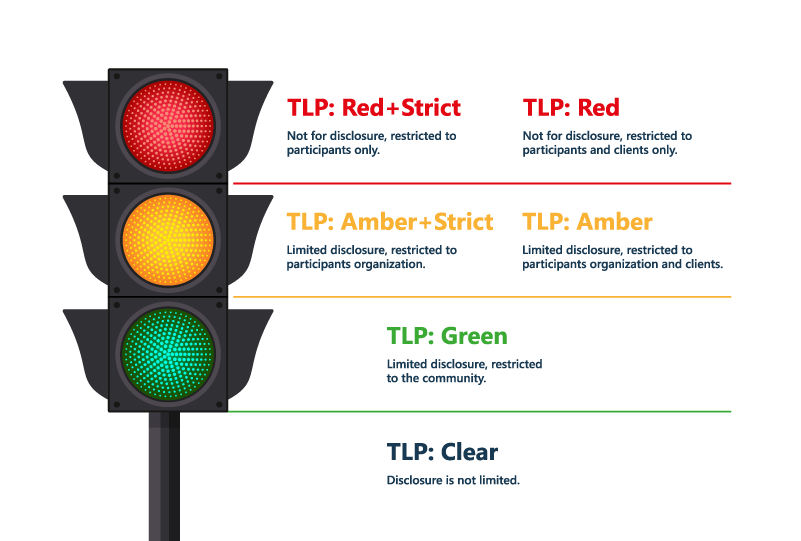
Adopting the Traffic Light Protocol (TLP) Model
Implementing TLP in Microsoft Purview is simple, efficient, and easier than many organizations believe. The goal is to make sensitivity labelling more accessible for users while leveraging Purview’s strong security features in the background. Here’s how to adopt TLP and coordinate it with sensitivity levels in Microsoft Purview.
Step 1: Define Four-Six Core Labels
Create the Labels in Purview Compliance Portal and define four to six core labels aligned with TLP categories:
- TLP: RED (Strict) → Confidential – Highly Restricted
- TLP: RED → Confidential – Restricted
- TLP: AMBER (Strict) → Confidential – Internal (No external sharing)
- TLP: AMBER → Confidential – Internal
- TLP: GREEN → Confidential – Community
- TLP: CLEAR → Public
| TLP Colour | Purview Sensitivity Label | Sharing Guidance |
|---|---|---|
| TLP: Red | Confidential – Highly Restricted | Named recipients only |
| TLP: Red Strict | Confidential – Restricted | Internal use only |
| TLP: Amber | Confidential – Internal (Strict) | Internal only, no guests |
| TLP: Amber Strict | Confidential – Internal | Internal sharing allowed |
| TLP: Green | Confidential – Community | Share with trusted partners |
| TLP: Clear | Public | Safe for public distribution |
We have implemented this simplified TLP taxonomy within our own organization and across many client environments as part of broader Microsoft Purview Information Protection rollouts. Our approach goes beyond creating labels; it includes configuring secure external sharing policies, enabling encryption and access controls, and deploying monitoring tools to maintain compliance.
This comprehensive approach enables users to confidently classify content with TLP labels, while IT teams maintain complete visibility and control over sensitive data. You can also visualize TLP adoption across your tenant with real-time insights into label usage, identify unlabeled content, and address compliance gaps. To learn more about Envision IT’s Tenant Dashboard for Microsoft 365, visit here.
Step 2: Configure Protection Settings
Assign security controls to each label:
RED (Strict) → Encrypt, restrict to named users/groups only
RED → Encrypt, internal only
AMBER (Strict) → Encrypt, block external sharing completely
AMBER → Encrypt, internal sharing allowed
GREEN → Optional encryption, allow trusted domains
CLEAR → No encryption, public access
Step 3: Publish Labels
Use Purview label policies to make these labels available to the right user groups and workspaces across Microsoft 365.
Step 4: Monitor Adoption
Track usage with Purview reports or Envision IT’s Tenant Dashboard for Microsoft 365. Identify unlabeled content, measure adoption, and ensure readiness for Microsoft Copilot.
Track usage with Purview reports or the Microsoft 365 Tenant Dashboard to identify unlabeled content, gauge adoption, and ensure readiness for Microsoft Copilot.
Implementation Checklist
✓ Discovery Workshop – Assess your current labelling and security setup.
✓ Design & Build – Create TLP-aligned labels and configure protection settings.
✓ Pilot Deployment – Test labels with a small group before full rollout.
✓ User Training – Educate employees on how and when to apply labels.
✓ Automation Setup – Enable auto-labelling for sensitive data like PII.
✓ Monitoring & Optimization – Use dashboards to track adoption and adjust policies regularly.
The Bottom Line – Fewer Labels, Stronger Compliance
When it comes to sensitivity labels, less is more, and keeping your labelling simple isn’t just easier; it’s smarter. A streamlined TLP taxonomy reduces decision fatigue, boosts user adoption and confidence, and improves accuracy, all of which build stronger compliance throughout your organization. It also sets you up for secure, AI-powered collaboration with Microsoft Copilot. Organizations that embrace simplicity through practical frameworks like TLP experience faster deployment, better adoption, and tangible results.
Next Steps to Better Information Protection
Ready to turn your intention into action? Here’s how you can continue your journey toward better data governance:
📊 Visualize and Optimize
Use Envision IT’s Tenant Dashboard for Microsoft 365 to track label adoption and success, identify sharing gaps, and ensure ongoing compliance across your tenant.
🎥 Watch the Webinar: Copilot & Security Readiness in 90 Days
Discover effective strategies to safeguard data and equip your team for AI-driven workflows. Implement Microsoft Purview with our proven 90-day action plan.
Missed Part 1 and Part 2? Catch Up Here!
If you’re joining us mid-series, don’t worry, you can always go back and catch up on what you missed:
Part 1: Building Your 90-Day Microsoft Purview Rollout
Part 2: Tackling Oversharing Risks and Creating a 90-Day Action Plan
These articles establish a foundation for understanding Purview’s role in data governance and offer practical steps to minimize the risk of oversharing, which is essential before exploring TLP and sensitivity labels.
Ready to secure your sensitive data with Microsoft Purview?
Ensure a smooth and successful rollout with Envision IT’s Microsoft Purview Information Protection engagement. We will guide you from planning to deployment by assessing your data landscape, training your team, and implementing a customized strategy for information protection and data loss prevention.
Get in touch with us today to discover how we can speed up your Purview implementation, protect your data, and enable your team. Click here to learn more about our approach to Microsoft Purview Information Protection.
Subscribe to Modern Work Monthly
Get the latest Microsoft 365 + Copilot insights to help your teams work smarter, faster.
We respect your inbox. Unsubscribe anytime.