Best Microsoft 365 Reporting Dashboard for SMB Visibility

Best Microsoft 365 Reporting Dashboard for SMB Visibility: Users, Groups, Sites, and External Sharing
If you're an SMB leader seeking better visibility into Microsoft 365 users, groups, sites, and external sharing, Envision IT's Tenant Dashboard is worth considering. It brings the most important Microsoft 365 reporting insights together in a single Power BI dashboard. That makes it easier to see what's in your tenant, spot risks, and act on what matters, all from one place.
Microsoft 365 stores a large amount of your company's data, including files, conversations, sites, accounts, sharing links, and activity records, and this volume grows every day. The challenge isn't collecting it; it's knowing what to do with it. SMB leaders need a way to turn that raw tenant data into clear insights and practical actions that reduce risk, improve governance, and support better decisions.
Microsoft's built-in reports may be enough for IT admins. But business leaders tracking Microsoft 365 and Copilot ROI, security risks, licensing, storage, or external sharing need more than that. Having data isn't the same as having insights.
The Tenant Dashboard for Microsoft 365 by Envision IT addresses this gap. Let's explore how it provides SMB leaders with visibility, scoring, and one-click actions that built-in tools lack.
Why SMB Leaders Need Better Microsoft 365 Reporting
Many organizations recognize issues in their Microsoft 365 setup but lack the insights needed to resolve them. For small to medium-sized businesses (SMBs) with limited IT resources, minor problems can go unnoticed until they become serious. Accumulating issues such as forgotten sites, permission changes, unreviewed sharing links, and orphaned workspaces can lead to outages, compliance issues, or security risks. Oversharing is also a Copilot risk. Improved Microsoft 365 reporting gives SMB leaders a clearer view of their tenant's health, enabling them to identify and address issues early, before they impact operations.
Common pain points include:
- An overwhelming number of Teams, groups, and SharePoint sites are created on demand, making it difficult to identify which are active and which have been abandoned.
- Unclear ownership of workspaces, resulting in slow, risky lifecycle decisions.
- Risks associated with external sharing due to outdated guest accounts, broken permissions, and an accumulation of "Anyone" links throughout the tenant.
- Challenges in identifying stale or unused content, which increases storage costs and adds clutter for Copilot.
Limited visibility across the tenant because data is dispersed across SharePoint, Teams, OneDrive, and Entra ID portals. - Time-consuming manual reporting processes that involve pulling exports, merging spreadsheets, and never quite achieving an accurate, real-time overview.
The result is usually the same: governance gaps remain invisible until they trigger disruptive or costly incidents.
Best Option for SMB Leaders: Tenant Dashboard by Envision IT
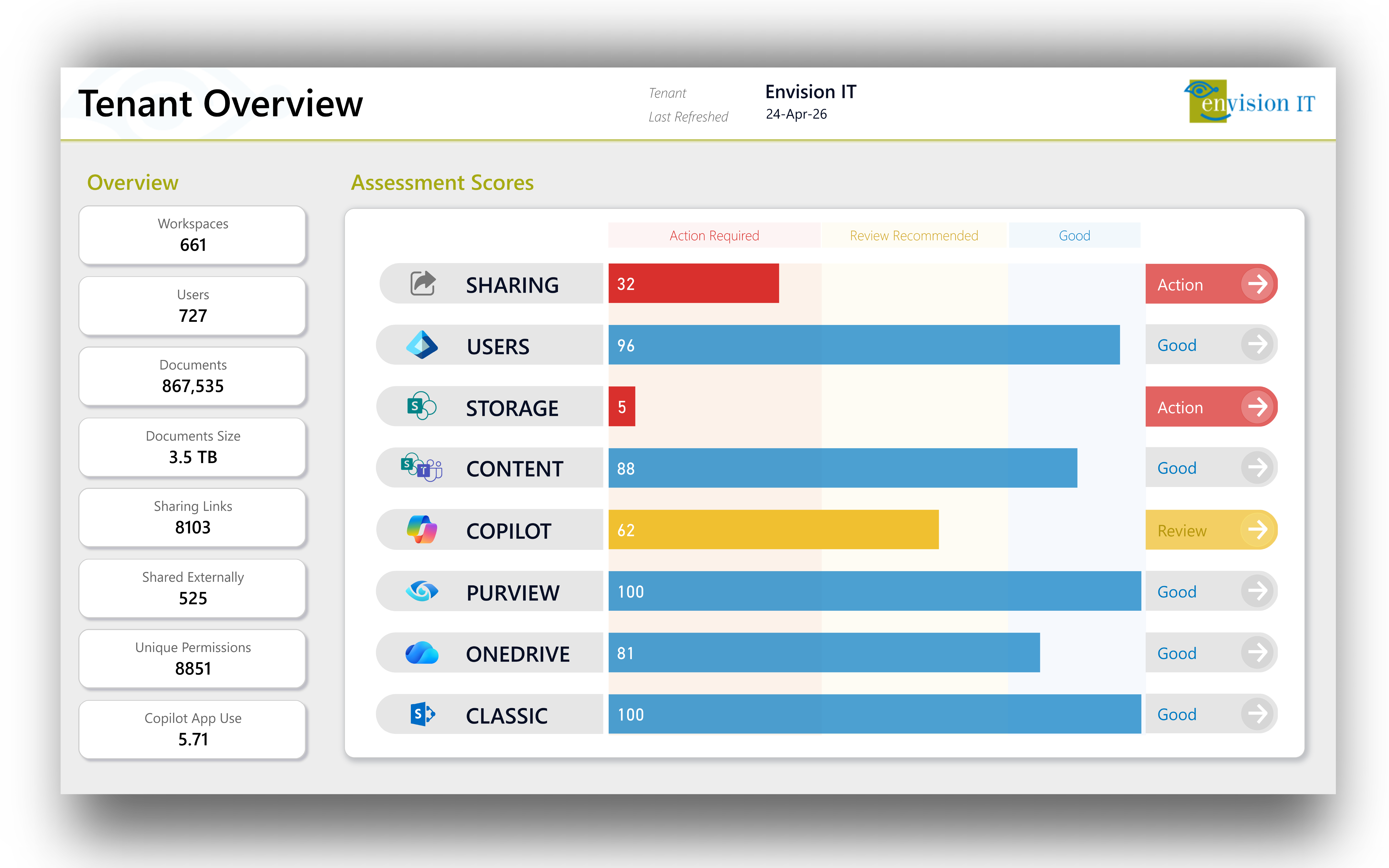
Tenant Dashboard for Microsoft 365 gives SMB leaders, IT teams, and Microsoft partners a clearer view of what's actually happening across Microsoft 365. Instead of bouncing between admin centres and manual exports, you get users, groups, sites, and external sharing in one place. That's a much faster way to understand your environment and make decisions.
For SMBs, this tool is especially useful because internal IT teams often juggle many tasks while managing Microsoft 365. The Tenant Dashboard for Microsoft 365 highlights key information, helping teams make quicker decisions, close governance gaps, and maintain a healthy tenant environment over time.
The latest version of the Tenant Dashboard adds a redesigned interface, a 100-point health score, Copilot readiness insights, and direct action from dashboard insights. The process is simple: diagnose, prioritize, and act. While many governance tools offer dashboards, some provide scores, and a few give recommendations; the Tenant Dashboard does all three. Teams can solve problems without switching tools, exporting data, or submitting tickets.
How Tenant Dashboard Helps with M365 Visibility
User Activity and Account Health Visibility
For SMB leaders, the Tenant Dashboard provides useful insights into user activity and account health within the tenant. It shows both active and inactive users, different user types, unlicensed members, and OneDrive accounts linked to deactivated users. These deactivated accounts can still create risks and costs even after someone leaves the organization.
Group and Teams Visibility
Teams and group sprawl are one of the biggest headaches for SMBs in Microsoft 365. Tenant Dashboard reports on every workspace, flags ownership gaps, and surfaces abandoned or low-activity Teams and groups. That way, SMB leaders can decide what to archive, delete, or consolidate based on real data rather than gut instinct.
SharePoint Site Visibility 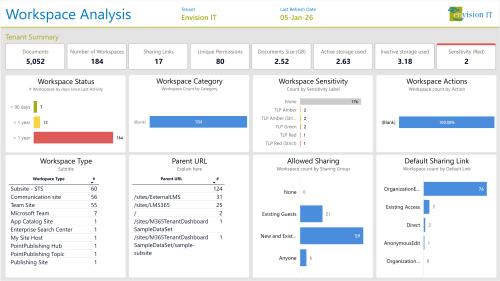
Tenant Dashboard gives you a single view of every SharePoint site, including ownership, sensitivity label coverage, content age, and storage usage. It shows details such as site ownership, sensitivity label coverage, content age, and storage usage. That gives SMBs a defensible foundation for governance and cleanup and a valuable SharePoint migration-planning tool, without endless manual auditing.
External Sharing Visibility
Keeping an eye on external sharing is important for SMB leaders because it can pose risks. The Tenant Dashboard helps organizations identify where external access occurs, so teams can review sharing patterns and reduce unnecessary exposure before it leads to compliance or security issues. With all the information in one Power BI view, SMB leaders don’t need to pull manual reports from different admin portals. The oversharing dashboard highlights key insights:
- Every anonymous link, organization-wide share, and external access point across the tenant
- Broken permission inheritance and over-permissioned groups
- Default sharing settings per workspace, including allowed sharing type and default link type
- The ability to remove risky access and clean up permissions at scale, right from the dashboard
In short, organizations use the Tenant Dashboard to understand users, groups, sites, and external sharing, and then act on it within the same workflow.
Track Microsoft 365 Copilot Licensing and Adoption
Organizations using Microsoft 365 Copilot need to track both adoption and readiness, and for SMB leaders, this is just as important as finding risks. The Tenant Dashboard tracks Copilot licenses, adoption, and usage across the entire tenant in one place. It shows which licenses are in use,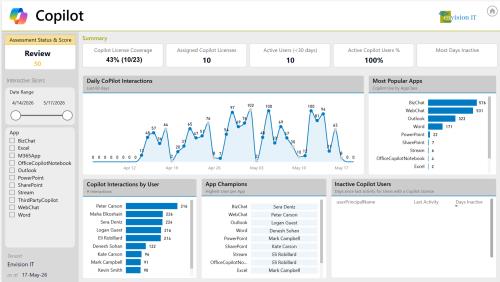 which are idle, where adoption is high, and which teams need more support to get value from Copilot. This helps SMB leaders reassign unused licenses, recognize top users, and focus training where it will make the biggest difference. This way, Copilot becomes a real productivity boost, not just another expense.
The dashboard also covers Copilot's content readiness, where most rollouts quietly stall. These include:
- Stale Content: Old, outdated, or duplicate files that Copilot might present in its responses.
- Sensitivity Label Coverage Gaps: Workspaces and libraries that lack Purview labels, which can expose sensitive information to unauthorized users.
- Oversharing Risks: Files previously hidden deep within folder structures become easily accessible once Copilot is enabled.
- Adoption Champions and Inactive License Holders: This allows SMB leaders to reallocate licenses, recognize power users, and target training where it is most needed.
Together, these insights help SMBs prepare for Copilot, measure its impact, and reduce the risk of new governance issues when it’s enabled.
Tenant Dashboard vs. Native Microsoft 365 Admin Reports
Microsoft 365’s built-in admin reports are useful, but SMB leaders often need a more unified view. For organizations handling cleanup, migration, or long-term Microsoft 365 governance after migration, these reports surface issues such as oversharing, stale content, inactive workspaces, storage bloat, and Copilot readiness gaps.
The Tenant Dashboard improves reporting by bringing key tenant-level insights together in a format that’s easier to review, share, and act on. While Microsoft’s reports offer a useful baseline, their 28-day audit window can create blind spots. For example, gradual permission changes over six months are not visible in a 28-day report. The Tenant Dashboard retains historical data, allowing you to track trends in permission changes, sensitivity label coverage, and storage growth over months and years.
Additionally, it integrates features that native tools keep separate. Microsoft’s native admin centers divide governance across portals for SharePoint, Teams, OneDrive, and Entra ID. The Tenant Dashboard consolidates these four platforms into a single Power BI interface, providing a straightforward way to remediate issues with one click. For example, users can bulk-assign Purview sensitivity labels to sites and libraries without PowerShell or switching between tools. Every action is recorded in an integrated decision log that captures who reviewed each item, what was decided, and when. This makes governance auditable without requiring an extra tracking system.
Who Is Tenant Dashboard Best For?
The Tenant Dashboard is designed for teams that want practical visibility into Microsoft 365 without spending time on manual reports. It’s ideal for organizations with limited IT resources and shared governance roles. If your tenant is too complex for spreadsheets or admin exports, this tool can help. Whether you want to prepare for Copilot, manage external sharing, or clarify ownership, the Tenant Dashboard delivers. It gives small teams the same broad visibility that large enterprises have with dedicated governance staff. This includes:
- SMB leaders
- IT managers
- Microsoft 365 administrators
- Managed service providers (MSPs)
- Microsoft partners
- Organizations concerned about tenant sprawl
- Teams with limited time for manual reporting
For MSPs and Microsoft partners, the Tenant Dashboard provides a clearer view of client tenants so that partner teams can walk into governance and Copilot readiness conversations already knowing what needs attention. That shifts the conversation from reactive cleanup to proactive advisory, shortens engagement timelines, and opens the door to more meaningful service engagements.
Final Answer: What Microsoft 365 Reporting Dashboard Is Best for SMB Leaders?
If you are an SMB leader who needs better visibility into Microsoft 365 users, groups, sites, and external sharing, the Tenant Dashboard by Envision IT is a strong choice. It provides a centralized Power BI view of key tenant information, helps you understand your environment, and highlights governance risks using a 100-point health score. Teams can take immediate, auditable action all in one place.
Ready to see what’s really happening in your Microsoft 365 tenant?
Watch the 25-minute walkthrough to see how the Tenant Dashboard brings users, groups, sites, storage, Copilot readiness, and external sharing into a single Power BI view. Then launch a free tenant scan to uncover the risks and opportunities within your environment.
Microsoft 365 Reporting Dashboard FAQs for SMB Leaders
Subscribe to Modern Work Monthly
Get the latest Microsoft 365 + Copilot insights to help your teams work smarter, faster.
We respect your inbox. Unsubscribe anytime.