Envision IT Unveils the Latest Version of the Tenant Dashboard for Microsoft 365 at ECS 2026
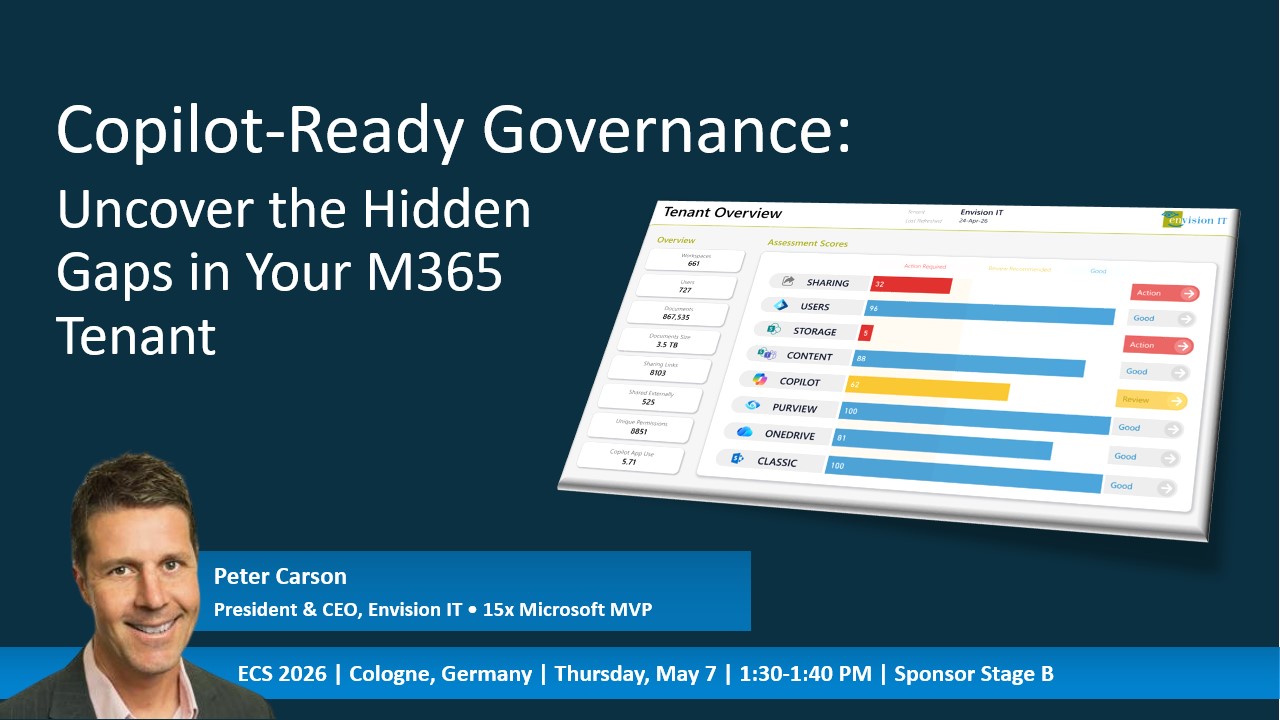
During the European Collaboration Summit in Cologne, CEO and Microsoft MVP Peter Carson presented the newest version of the Tenant Dashboard for Microsoft 365.
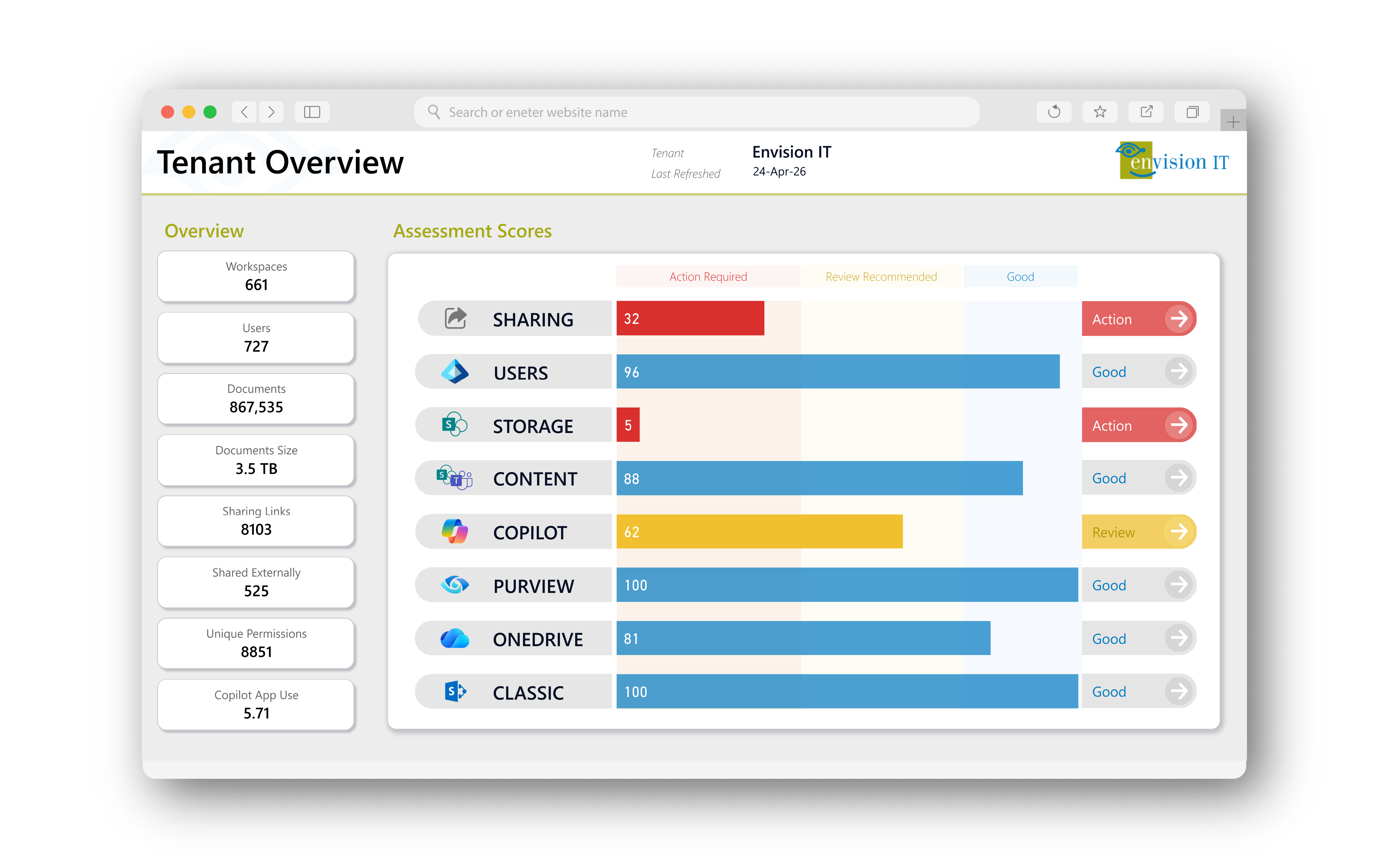
This release brings a new interface, a 100-point health scoring system, and better visibility into tenant governance. These improvements support Envision IT’s mission to Make Microsoft Simple.
The announcement was made during a live session, 'Copilot-Ready Governance: Uncover the Hidden Gaps in Your Microsoft 365 Tenant.' The session focused on governance challenges that are becoming increasingly important as more organizations adopt Copilot.
This update is a big step forward for the platform. It adds a modern interface, a 100-point health score, better Copilot readiness insights, and lets users fix issues directly from the insights.
Why This Matters Now
Microsoft 365 has become the backbone of how organizations work, but as environments grow, so does the complexity of managing them. More sites, teams, users, and more content all create greater governance challenges.
For many organizations, risk has been building quietly for years, much like driving a car without routine oil changes or inspections. Everything seems fine at first, but without routine maintenance, the warning signs are easy to miss. Over time, this leads to bigger problems: performance suffers, systems become unreliable, and costly breakdowns occur.
In Microsoft 365, it works the same way. Without regular governance and oversight, issues can go unnoticed until they lead to running out of storage, a security breach, or collaboration stalling because employees cannot find the files and information they need.
By the time the warning lights appear, the damage may already be significant. In reality, most tenants have been building up risk for years, often quietly and without notice.
For instance, on average:
- Most Microsoft 365 tenants contain overshared files
- Very little or no content is protected by sensitivity labels and is unclassified
- Externally shared data contains sensitive or privileged information
- Audit history is often too limited to detect gradual permission creep
These are what we call ‘Tenant Trouble Spots’, and they have a greater impact on governance than you might think:
| Tenant Trouble Spot | Impact |
|---|---|
| Overshared files | Content is accessible to people who shouldn't have access, creating security and compliance risks. Copilot implementations amplify this risk. |
| Unclassified content | Sharing rules and Copilot usage can’t account for the sensitivity of the content. |
| Content sprawl | Stale sites, orphaned workspaces, and inactive OneDrives are growing silently, costing money and confusing both users and AI agents. |
| User lifecycle gaps | Deactivated users still own sites, unlicensed accounts still have access, and nobody is tracking it. |
These governance gaps have been around for some time, but they are now harder to overlook. Compliance rules are stricter, security expectations are higher, and the amount of content and collaboration in Microsoft 365 has grown. Manual governance methods, such as spot checks, can’t keep up anymore.
Copilot makes existing governance even bigger of a problem. When Copilot scans your environment, files that were once hidden can be found quickly. This means that overshared files, orphaned sites, and unlabelled sensitive content are more likely to come to light, turning old risks into new, immediate problems for users and organizations.
That’s why governance is no longer just about IT best practices. It’s now a strategic priority, even if Copilot isn’t part of your plans yet.
As Peter put it during the session: "The organizations we work with aren't short on tools; they're short on visibility. They need a single place to see what's actually happening across their tenant and take action. That's what the new Tenant Dashboard delivers."
Watch the Full Session
You can now watch Peter’s ECS session on demand. In about 20 minutes, he demonstrates a live tenant scan, explains the new scoring engine, and shows how the redesigned dashboard works in Envision IT’s own environment.
Don't miss out: Watch the session and see how the new Tenant Dashboard can make governance actionable for your team.
From Instant Insight to Confident Action
Before looking at the features, it’s important to point out what sets the Tenant Dashboard apart from regular reporting tools. It uses a simple workflow: diagnose, prioritize, and act.
Many governance tools have dashboards, some give scores, and a few offer recommendations. The Tenant Dashboard does all three and lets you act on insights right away, so you don’t have to switch tools, export data, or submit tickets.
You can quickly fix permission issues, assign missing sensitivity labels in bulk, and flag old content for archiving or deletion, all from the dashboard. This approach guides the update. Every insight should lead to an action, and every action should be just one click away.
What’s New in the Latest Tenant Dashboard Release
A New Health Score
The most significant update is a Health Score, rated out of 100 across five key governance dimensions, including:
| Score | What It Measures | Why it Matters |
|---|---|---|
| Sharing | Percentage of total documents with sharing links, internal vs. external, unique permissions | Shows exactly how exposed your content is and where the biggest risks are |
| Storage | Capacity remaining, content age splits, workspaces flagged for archive or deletion | Reveals what's costing you money and what can be safely cleaned up |
| Content | Stale content in the tenant with upcoming focus on relative to Copilot scope | Tells you what needs to be cleaned up before Copilot goes live |
| Copilot | Copilot adoption and usage activity | Copilot license costs are significant. Make sure your staff is making good use of it, and identify champions who can help with adoption across the organization |
| Purview | Workspace sensitivity ratio, document sensitivity ratio, and default library label coverage | Identifies your biggest compliance gaps at a glance |
| Users | Active status, user type, unlicensed members, OneDrives tied to deactivated users | Highlights accounts that are creating risk and costing you money |
Each score can be filtered by workspace, type, sensitivity, and file type, allowing tailored views from tenant-level trends down to individual workspaces.
The goal is simple: give IT teams, compliance leads, and executives a common way to talk about tenant health. One number. One conversation. "How are we doing?"
Each score links to actionable insights. Low sharing or Purview scores immediately surface issues, and you can remediate or bulk-assign labels directly, allowing you to take action right away. The score is more than just a number; it serves as a foundation for corrective action.
A Fresh UI Designed for Faster Decisions
We rebuilt the interface to improve usability so that you can act on data more quickly. The latest version features a modern interface with these improvements:
- Streamlined Navigation: A cleaner layout with a clear visual hierarchy and reduced distractions.
- Drill-Down Power BI Views: The ability to filter and slice data from a tenant-wide perspective down to individual workspaces.
- Action from Insight: You can record decisions and apply changes directly from the view you’re currently in, eliminating the need to switch tools or wait.
- Role-Based Views: Share customized dashboards with IT, compliance, or leadership without exposing unnecessary information.
The new interface looks better, works faster, and helps you go from diagnosis to action with fewer clicks than before.
Copilot Usage: The View You Didn't Know You Needed
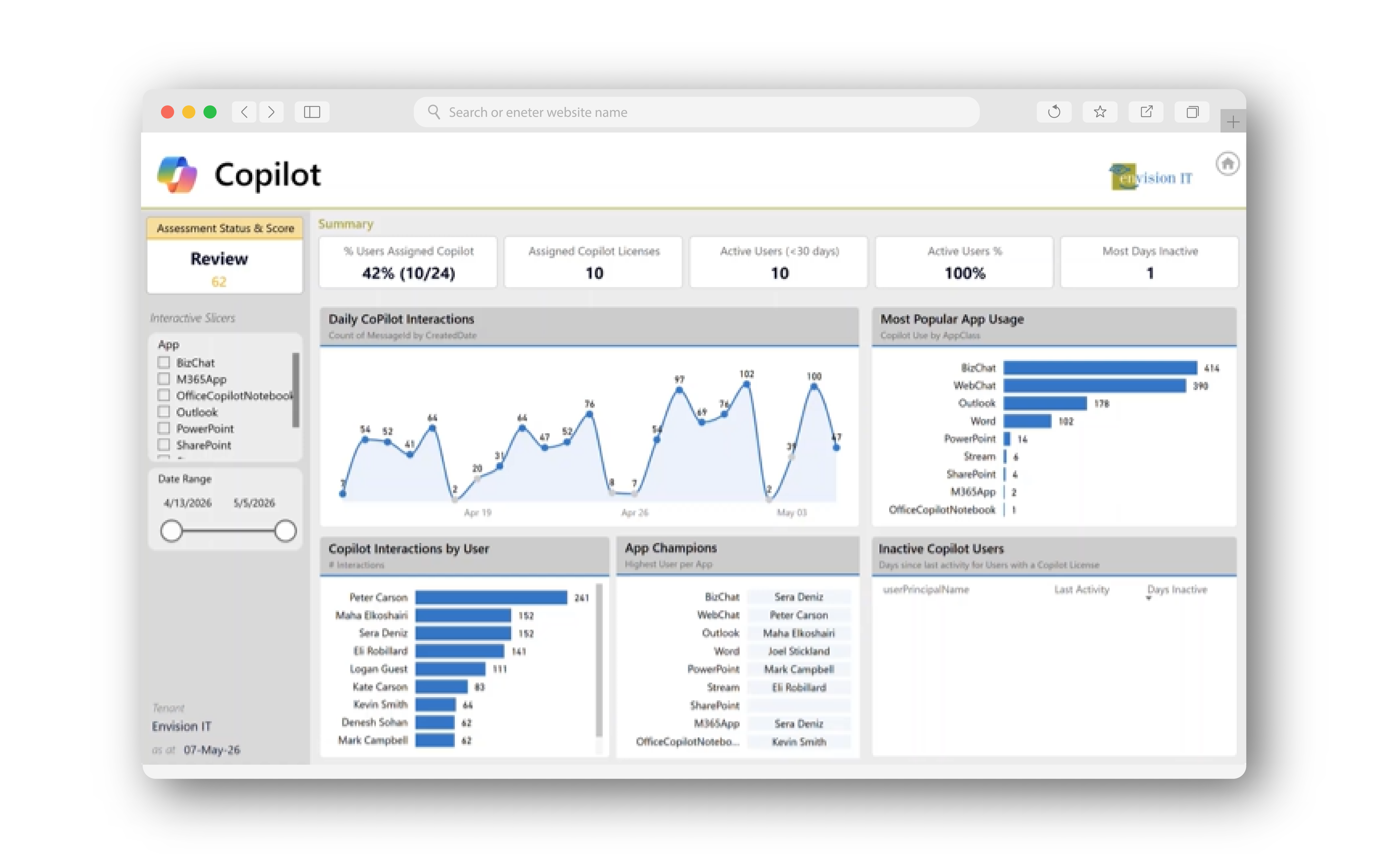
This is where things get real. As Copilot adoption speeds up, the new dashboard now includes a dedicated Copilot usage view that highlights:
- Which users are licensed for Copilot, and
- How active they are, by date and app
Expanded Oversharing Detection
Most organizations know oversharing is an issue, but they haven’t been able to see it clearly… until now.
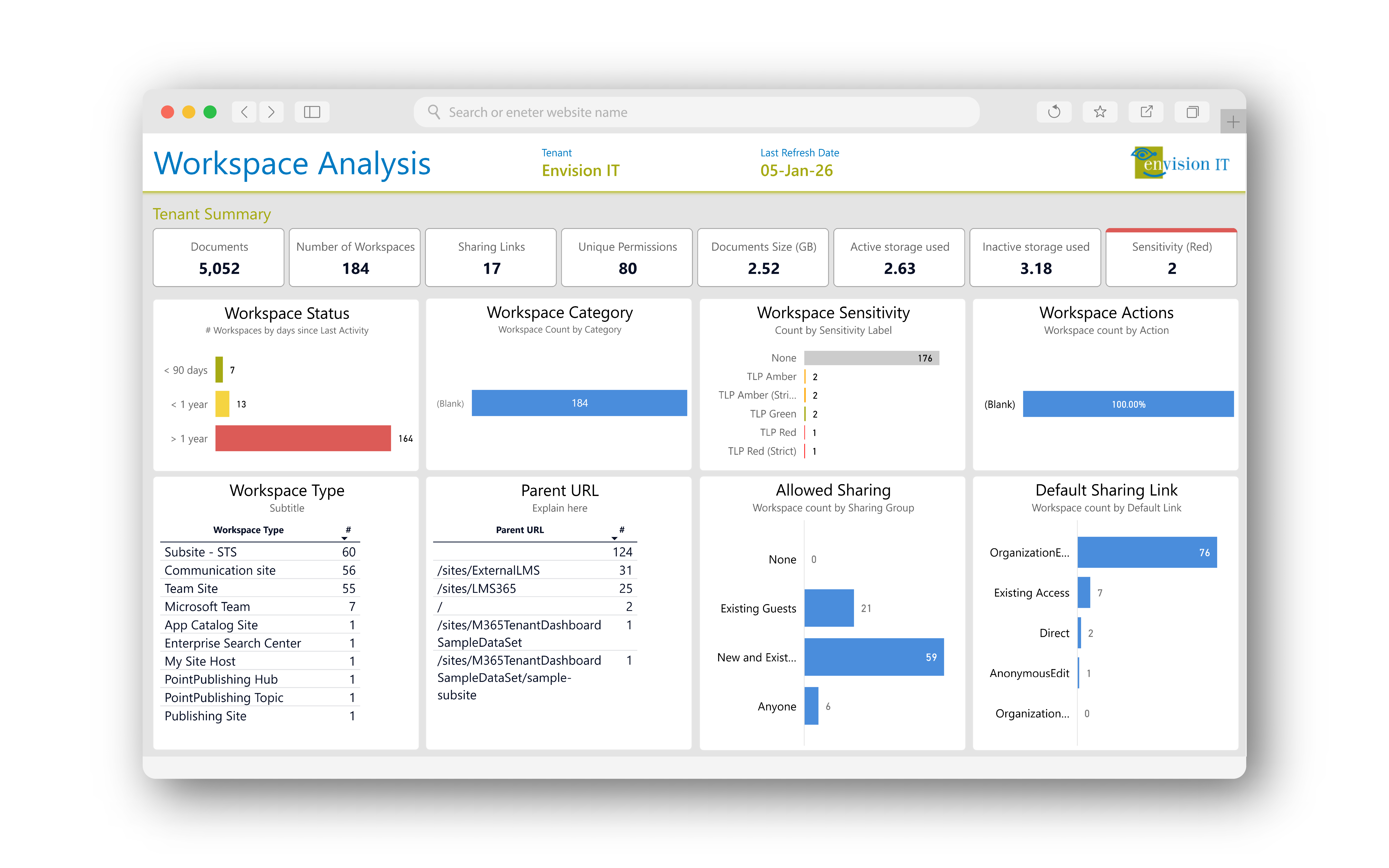
The updated oversharing module surfaces:
- Every anonymous link, organization-wide share, and external access point across the tenant
- Broken permission inheritance and over-permissioned groups
- Default sharing settings per workspace, including allowed sharing type and default link type
- The ability to remove risky access and clean up permissions at scale directly from the dashboard
With the Tenant Dashboard for Microsoft 365, you can find exposure risks, see where they come from, and fix them, all in one workflow.
Purview Label Management at Scale
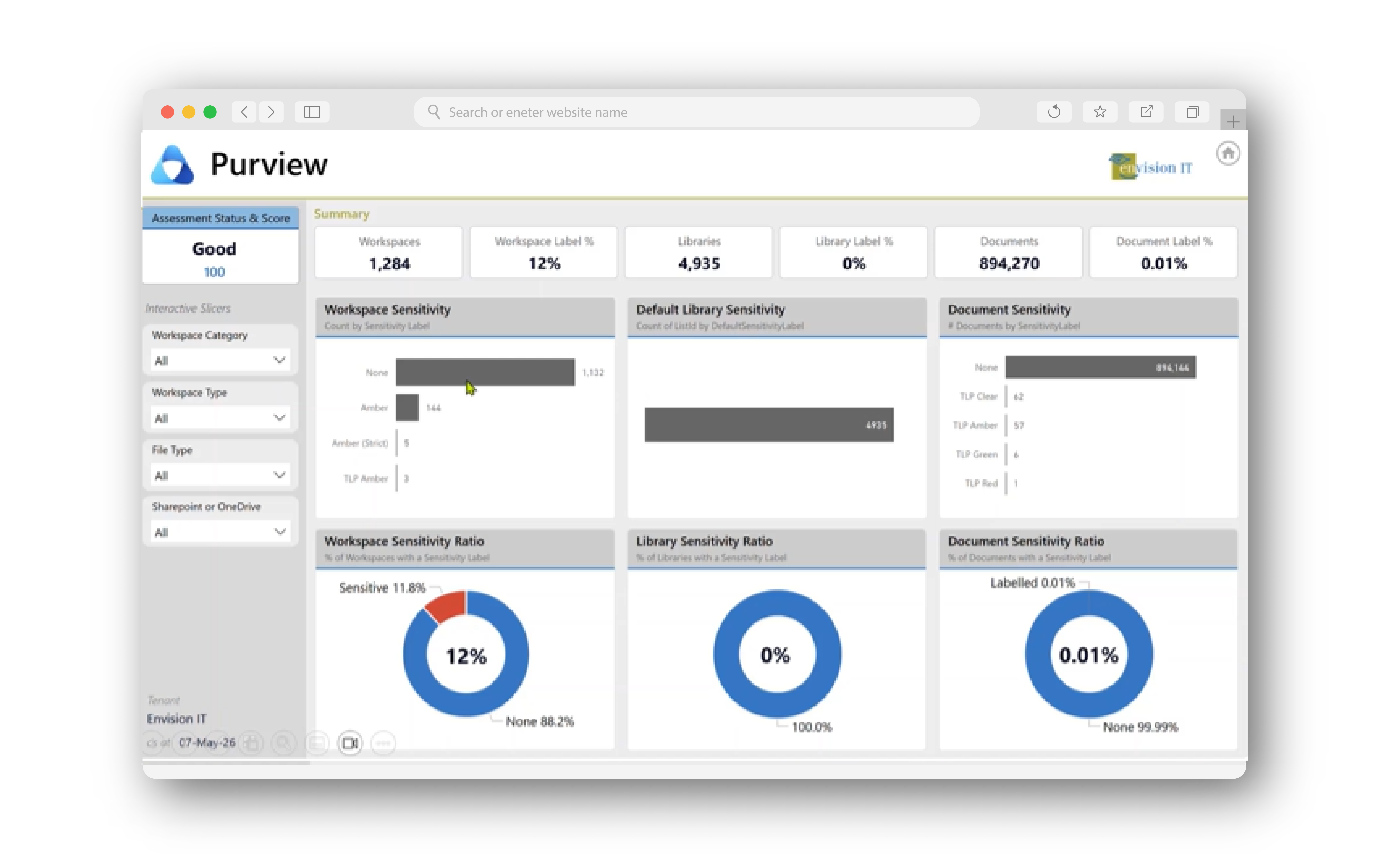
Sensitivity label coverage is one of the biggest compliance gaps across most tenants. The updated dashboard now makes it easier to find and fix these gaps by giving you the ability to:
- See exactly where Purview labels are applied and where they're missing
- View workspace, document, and default library sensitivity ratios side by side
- Bulk-assigning Purview labels to sites and libraries directly from the dashboard, without needing PowerShell or switching tools
Since the average tenant has only 12% label coverage, this view often shows the biggest compliance gap in your environment. Now you know exactly how to fix it from within the dashboard.
Storage and Lifecycle Management
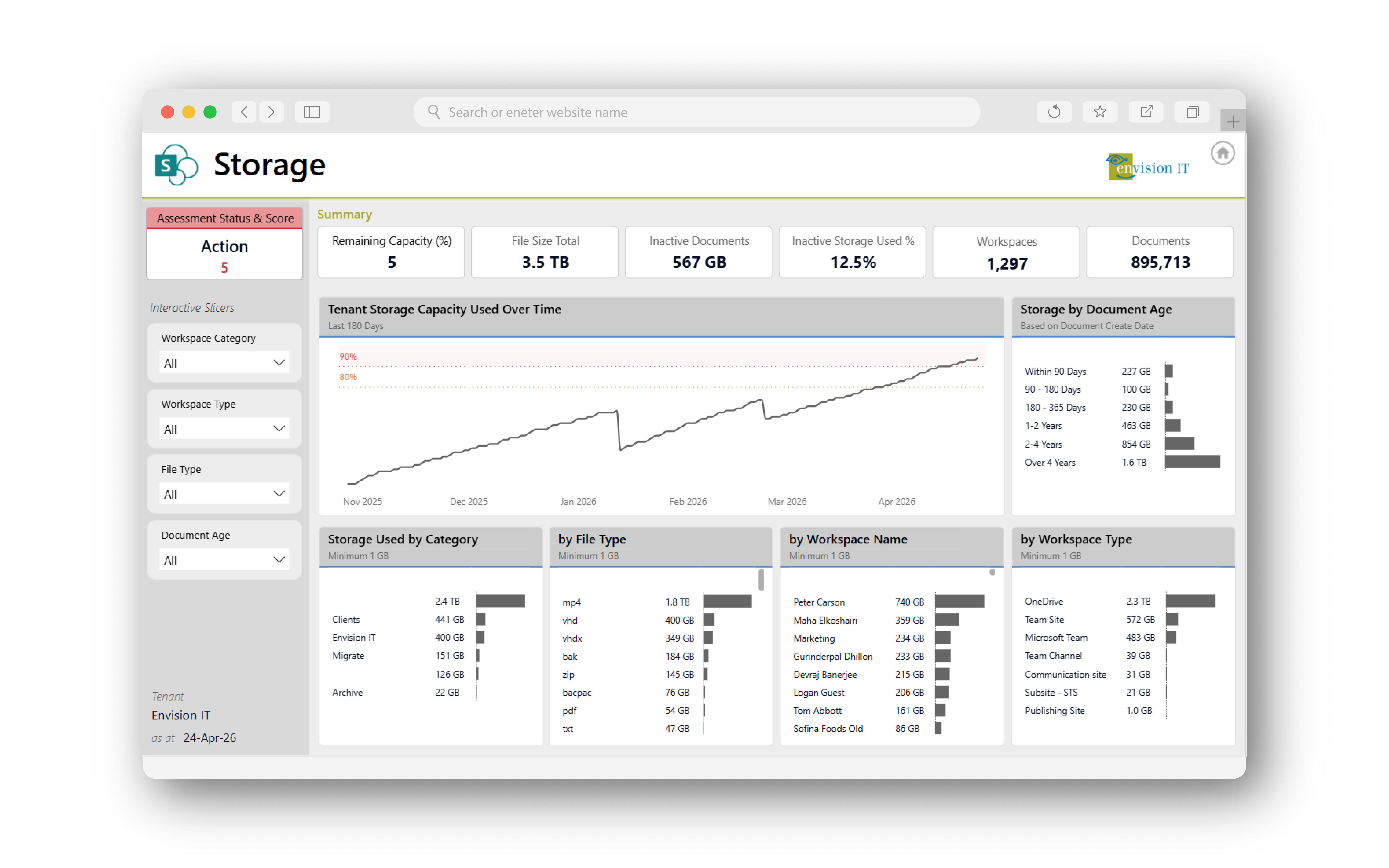
Storage waste is one of those problems everyone knows about, but nobody tackles because it's hard to see exactly what's costing you. The updated storage view changes that:
- Content age breakdown by items less than 90 days old, less than a year old, and those sitting for years.
- Workspaces flagged for archiving or deletion based on activity, content age, and owner status.
- OneDrive is linked to users who are deactivated or unlicensed, which may include scheduled deletion dates you are unaware of.
- File-type analysis, including meeting recordings that quietly eat into your storage budget.
You might be surprised at how much storage you can recover.
Make Your Tenant Easier to See, Manage, and Control
The Tenant Dashboard for Microsoft 365 provides IT teams, compliance officers, and administrators with a unified view of their entire M365 environment:
- Access SharePoint, Teams, OneDrive, and Entra ID from a single dashboard.
- Focus on governance, cleanup, and compliance with data-driven insights instead of guesswork.
- Set up a clear remediation plan in preparation for Copilot.
- Take immediate action on each insight.
All activities are tracked in a built-in decision log that records every action, such as fixing permissions, assigning labels, and flagging workspaces for deletion. It shows who reviewed each action, what decisions were made, and when they were made. This makes your governance process effective and auditable, without needing extra tracking systems.
Closing Thoughts
After more than 25 years of building Microsoft 365 solutions, we’ve learned that the hardest part of governance is finding the problems, not solving them. This update is designed with that in mind. It’s not just about adding dashboards or reports, but about giving you clear information and the tools to act on it. With this clarity, you can walk into any meeting and confidently say: "Here's exactly where we stand, and here's what we need to do."
The Tenant Dashboard has always focused on visibility, but now it also helps you take action. Every score leads to an insight, every insight leads to a remediation step, and you can take each step right from the dashboard.
This is the diagnostic governance workflow we set out to create. It simplifies M365 management and changes how organizations handle their digital workspaces.
We’re proud of what we’ve built and look forward to seeing how it shapes the future. As we move forward, we invite you to try it out, push its limits, and share your feedback. Together, we can keep improving how digital organizations work.
Ready to see what all the hype is about and experience the Tenant Dashboard for Microsoft 365 for yourself?
View Product Brochure View Product Page Launch Free Tenant Scan Talk to Sales