System.NotSupportedException: Cannot contact web site 'https://DOMAIN.sharepoint.com/' or the web site does not support SharePoint Online credentials
|
Published
Problem:
EUM unable to make calls to the SharePoint online. The Extranet API log registers the below error:
System.NotSupportedException: Cannot contact web site 'https://<domain>.sharepoint.com/' or the web site does not support SharePoint Online credentials. The response status code is 'Unauthorized'.
Solution:
Check in AAD that the secret for the EUM Graph API app has not expired
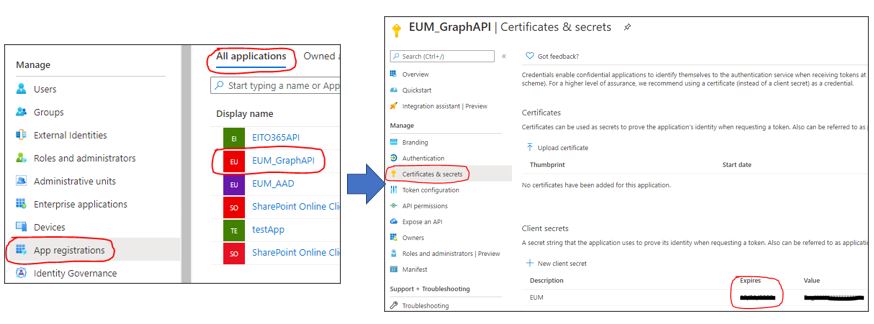
- In AAD, click App Registrations in the left hand menu
- Click to open the EUM_GraphAPI
- In the EUM_GraphAPI, click Certificates and secrets in the left hand menu
- Check that the secret is still valid. If expired, create a new secret and change its value in EUM Landing Admin Office 365 configurations page.
Check in Extranet API web.config that the SP credentials are still valid

If EUM installed as Azure App Service,
- Go to portal.azure.com and navigate to the App Service for EUM
- In the left hand menu click to open App Service Editor (Preview)
- Click Go
- In the left hand menu expand Extranet_API_V4 folder and lookout for web.config
- Click to open we.config and verify the SPUsername and SPPassword have valid values
If EUM is installed On Premises
- Go to the server where EUM is installed, and visit the Extranet_API_V4 folder and lookout for web.config
- Click to open we.config and verify the SPUsername and SPPassword have valid values