Products
Extranet User Manager
The Platform
Pricing
Services
Releases
Tenant Dashboard
Pricing
Staff 365
Use Cases
Boards and Committees
Client Portal
Partner Portal
Vendor Portal
Learning Management
Projects
Industries
Associations
Construction and Engineering
Healthcare
Local Government
Nonprofits
View all products
Services
Microsoft 365
Teams First Information Architecture
SharePoint Intranets
Upgrades and Migrations
Reporting and Dashboards
Purview Information Protection
AI
Copilot Readiness
Azure OpenAI
Azure AI Search
Software Development
Cloud Readiness Assessment
Enterprise Integrations
Forms and Workflows
View all services
Resources
Articles
Case Studies
Events
Resource Centre
Trust Centre
About
Who We Are
Contact Us
Partners
Become a Partner
Directory
Staff
Guest Speakers
Board of Advisors
All Members
Support
Support Request
Knowledge Base
Copilot Chat
Home
Support
Knowledge Base
Restarting EUM App Service
Restarting EUM App Service
|
Published
Navigate to
https://portal.azure.com
and sign in with Admin credentials.
Navigate to the EUM App Service.
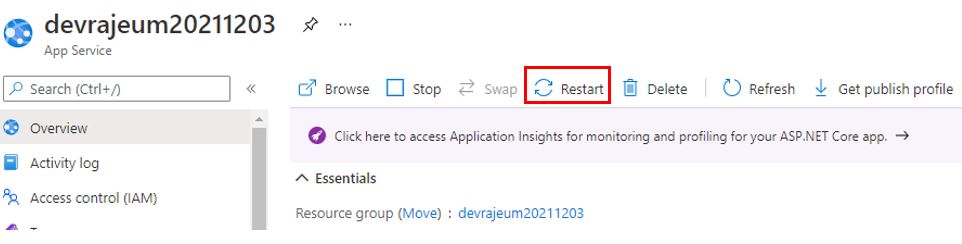
On the top menu, click Restart.