Is it possible to delete users?
Users once created cannot be deleted by all. However, they can be Deactivated by anyone having access to Landing Admin (Configuration User, Group Editor, Group Owner). Deactivating users would prevent them from logging in or accessing any Groups. Deactivated users can be Activated again if need be.
To Deactivate a User, login to Landing Admin and click Search User

Once the user is found, click Edit to load the User Details page

In the User Details page change the User Status to Deactivated and click Update. Success message would be displayed to indicate that the user status is updated

If Deactivating the users is not enough, then the Deactivated Users can be deleted in different ways depending upon the EUM version
EUM 4.1.7247.1 and above:
Deactivated Users can be deleted by anyone having Edit Configuration User access to EUM.
- Login to EUM's Landing Admin as Edit Configuration User and navigate to User Search page
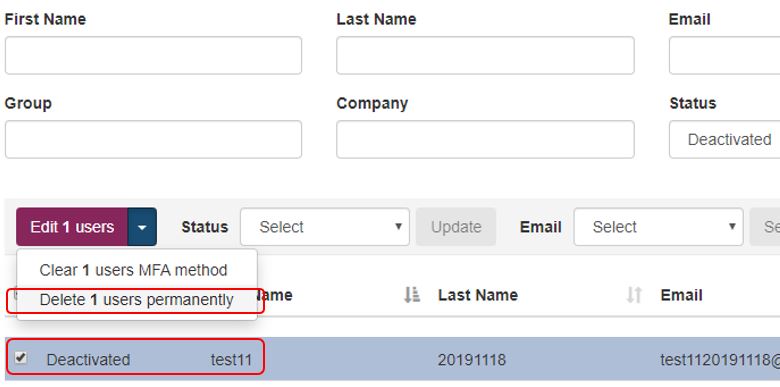
- Search for Deactivated users and select the deactivated user to be deleted
- Click Edit x users button and from the available options select Delete x users permanently
EUM 4.1.7212.1 and below:
Deactivated Users can be deleted by anyone having access to the EUM Database.
- The Stored Procedure dbo.DeleteDeactivatedUsers has to be executed and this will delete all the Deactivated Users
- Additionally, the Table dbo.Disclaimer has to be edited to delete the data from the DisclaimerAccepted column for the deleted users