Image missing from emails sent from EUM
|
Published
A missing image can be due to the email server blocking the image from being downloaded. If not, then this can be fixed in EUM by anyone having Edit Configuration User access to EUM
After logging in to EUM's Landing Admin as Edit Configuration User, there are two places to be checked for the images to appear:
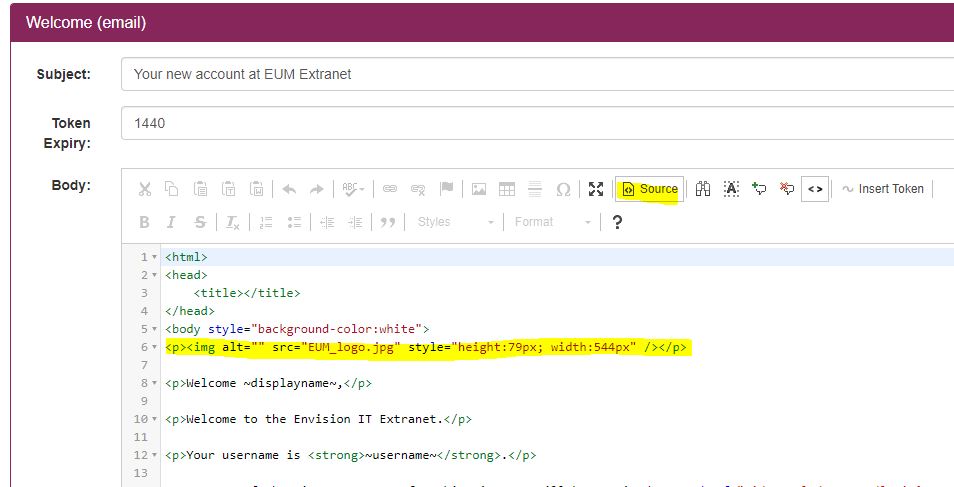
- Navigate to the email template in the Email Configuration page, and in the Source view verify if the image is a part of the template
- Navigate to Email Settings page. Verify the image path field has correct path to the image for the emails:
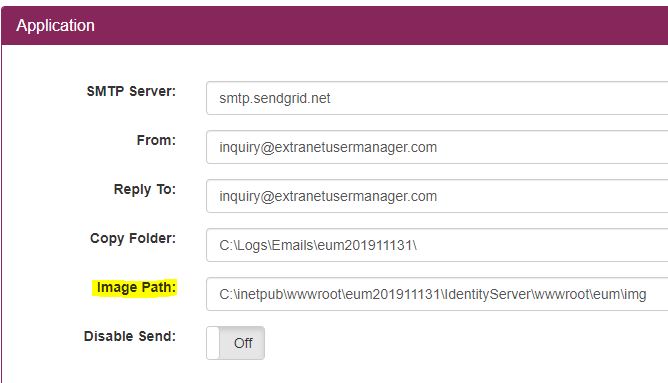
Normally the images should be in the IdentityServer\wwwroot\eum\img folder, and the Image path in the Email Settings page should mention the full path:
If EUM is installed on premises:
C:\inetpub\wwwroot\~EUM site folder~\IdentityServer\wwwroot\eum\img
If EUM is installed as Azure App Service:
D:\home\site\wwwroot\\IdentityServer\wwwroot\eum\img