How to change maximum items limit for viewing in Azure App Services Debug Console
|
Published
If your EUM is running as Azure App Service, and you need to do some change in one of the config files, then you would have to visit https://~your eum site~/DebugConsole. Then navigate to site/wwwroot/~The concerned folder
When you navigate to some of the folders, example, IdentityServer, you might see an error message that there are 337 items, but only 299 can be viewed.
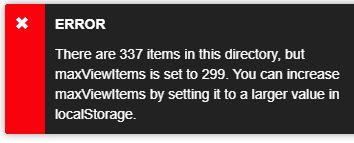
To view all the items, the maxViewItems value need to be increased. To do this, in Chrome open developer tools (F12). In the console, run
window.localStorage['maxViewItems'] = 400
Refresh the page and if necessary navigate back to the IdentityServer folder. Now all the items should be visible.