Dismantle EUM V5
|
Published
Things like upgrading to EUM V6 would lead to sunset of EUM V5, and the following steps can be taken to safely dismantle EUM V5 from your Azure tenant
Note: Before dismantling EUM V5 due to upgrading to EUM V6, please make sure all EUM Groups are being exported to EUM V6. Please refer the related article for that: Manually takeover existing Azure AD groups to EUM V6
Steps to dismantle EUM V5
-
Delete the related App Registrations from the Azure AD
- Login as Global Admin to your Azure AD
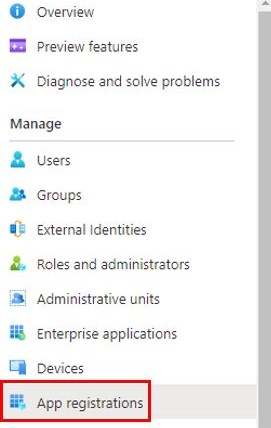
- In the left hand menu click "App Registrations"
- Delete the two apps:
- EUM_AAD
- EUM_GraphAPI
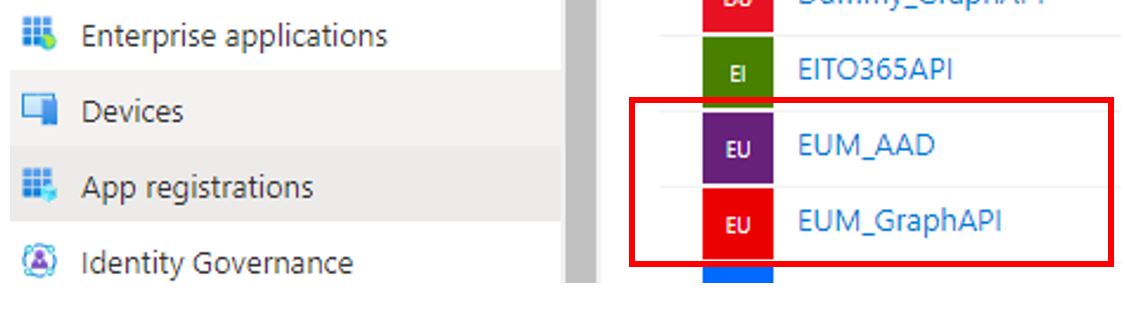
- If you had EUM SPFx Webpart enabled in SharePoint, then there would be a third App: EITO365API. That will also need to be deleted
-
Delete the SQL Database, if not a part of the same Resource Group as the EUM in Azure Portal
-
Delete the Resource Group for the EUM in Azure Portal
- Login to https://portal.azure.com as Global Admin
- Navigate to "Resource Groups"

- Select the Resource Group for EUM V5 and delete that