Did Not Receive the One-Time Passcode SMS for Signing In
|
Published
While trying to sign in using a Mobile Number, you should receive the One-Time Passcode SMS after you click the Send Code button on the sign in screen.
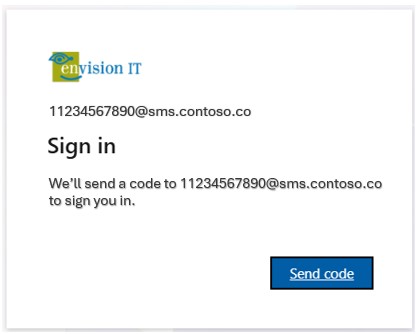
However, there might be occasions where the SMS will not be received within a few seconds. In this case, please check the below:
- Is the number showing on the sign in screen correct? In this case, the login account shown is 11234567890@sms.contoso.co. Here, 11234567890 is the mobile number which should receive the SMS. This can be broken down as:
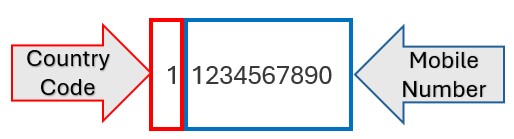
Therefore, the mobile number here is 1234567890.
Please check accordingly if the mobile number on the sign in page is correct. - Did you unsubscribe from receiving SMS from the number that would normally send you the One-Time Passcode SMS?
- Check if the SMS landed in your spam folder.
- Android Phone
- Open the Messages app.
- Tap your profile picture or the three-dot menu icon in the top right corner.
- Select spam and blocked.
- Tap the message you want to review.
- iPhone
- Open the Messages app.
- Tap the filters button.
- Tap spam.
- Tap the message you want to review.
- Android Phone
However, if you still do not find any SMS, please contact the administrator.