Delete a Guest User in EUM V6
|
Published
One can delete Guest User using EUM Admin if one has any one of the below EUM Roles:
- EUM Manager
- Global Admin
To add a new Guest User in EUM Admin follow the below steps:
- Login to EUM Admin
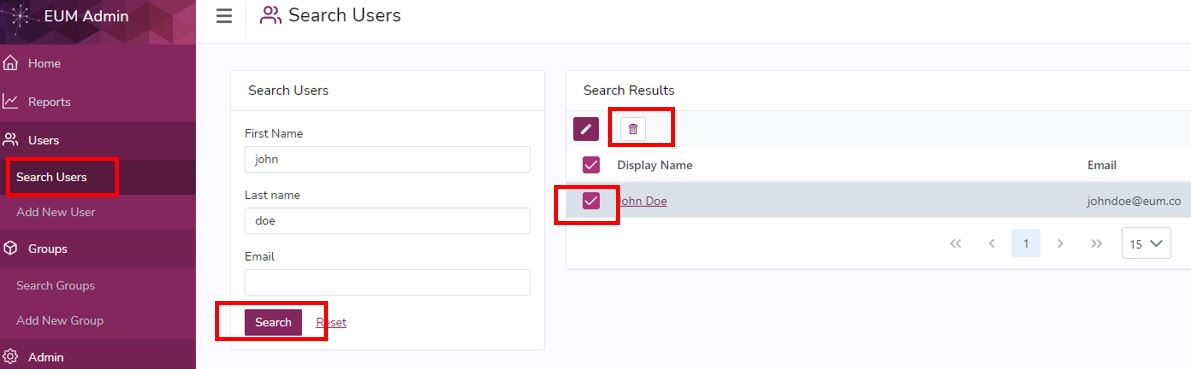
- Click "Search Users"
- Search for the user you want to delete
- Select the user and click the bin on the top of the list
- Check and confirm the deletion in the confirmation prompt
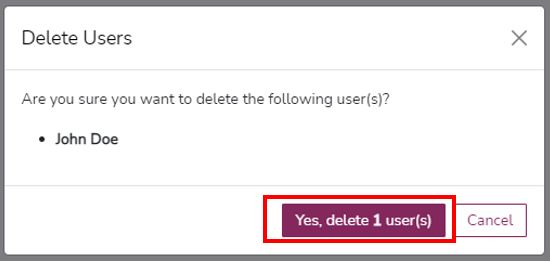
- The user will be deleted and Success message will be displayed.
Note:
- Making use of the User Search filer, multiple users can be deleted in bulk.
- User deleted through EUM also deletes the user from Azure AD, and removes the user from all the EUM Groups.