Change URL in EUM 4.1
|
Published
If the url for EUM needs to be changed for some reason, then that can be done in a few places listed below. In these places the old url is to be searched and replaced by the new one:
In the wwwroot
- Extranet_API_V4\web.config
- IdentityServer\IdentityServer.exe.config
- Landing\appsettings.json
- LandingAdmin\web.config
- Trust\RegisterIdentityServerIP.ps1
- EIT_O365_API\appsettings.json
In database
- SystemConfiguration table
- ClientRedirectUris table
- ClientPostLogoutRedirectUris table
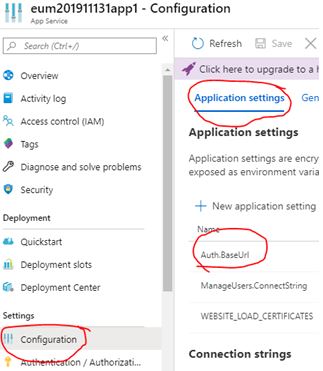
In App Services
- If EUM is installed as Azure App Service, then the changes need to be done in Configuration page/Application Settings tab
In EUM Landing Admin - Email Configuration
Login to EUM Landing Admin as a Edit Configuration User and navigate to the Email Configuration page. Check if any of the Email templates is using the old url. If found, replace with the new one.
- Select the Email Type
-
Click [Source] to go to the Source view
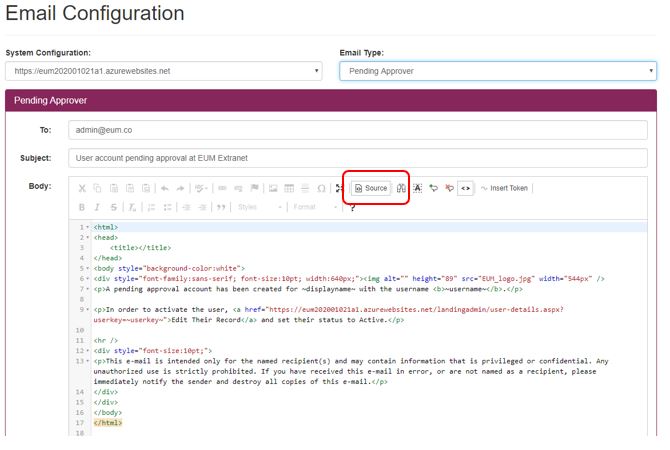
- Lookout if the template has the old url
- If old url is present, replace it with the new one
- Click [Source] again to come back to normal view
- Click [Update] to save the changes in the template
In Azure Active Directory
If EUM is wired up to Azure Active Directory to create B2B users and allow users to login using B2B:
EUM_GraphAPI app
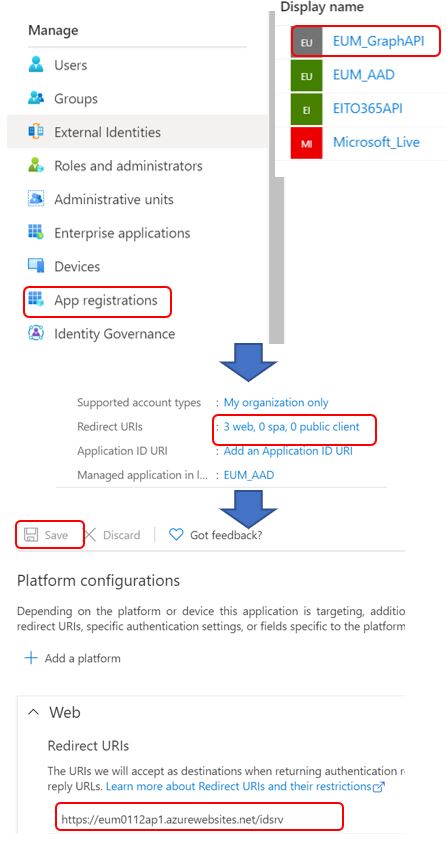
- Navigate to Azure Active Directory and login with admin credentials
- In the left navigation select "App registrations"
- Click "EUM_GraphAPI" app
- Once the app page loads click the Redirect URIs
- Change the url in the Redirect URIs form to have the new EUM uri: https://<new EUM host url>/idsrv
- Click Save
EUM_AAD app
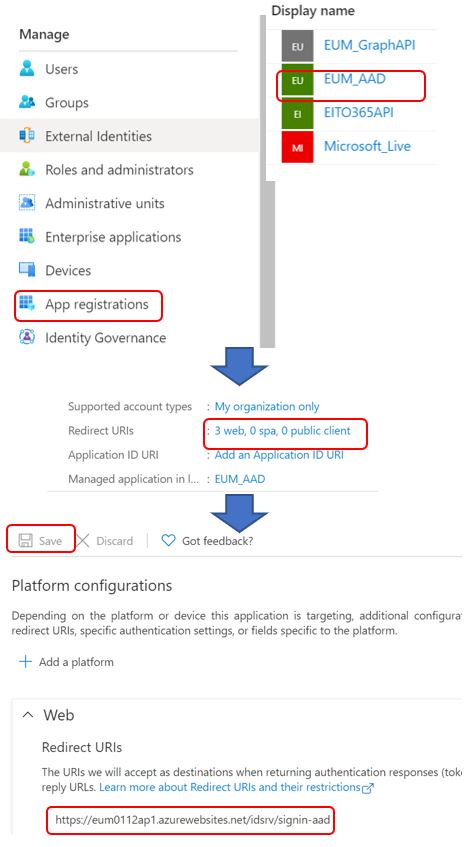
- Navigate to Azure Active Directory and login with admin credentials
- In the left navigation select "App registrations"
- Click "EUM_AAD" app
- Once the app page loads click the Redirect URIs
- Change the url in the Redirect URIs form to have the new EUM uri: https://<new EUM host url>/idsrv/signin-aad
- Click Save