Add Groups to Users while Importing Users - EUM V5 and below
|
Published
While importing users to EUM, these users can directly be put into Groups. The Groups however should already be existing in EUM.
In the Import User Template, add a column called "Groups" to the end. Put in the group names the user should be a member of against the user. If the user is intended to be a member of multiple groups, then put in multiple Group names separated by comma.
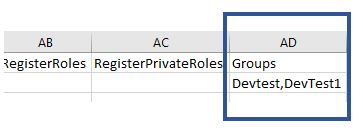
Upon importing this template, the imported users would have Groups assigned.