Claude Meets Copilot: Why We Enabled Anthropic + Copilot Frontier in Microsoft 365
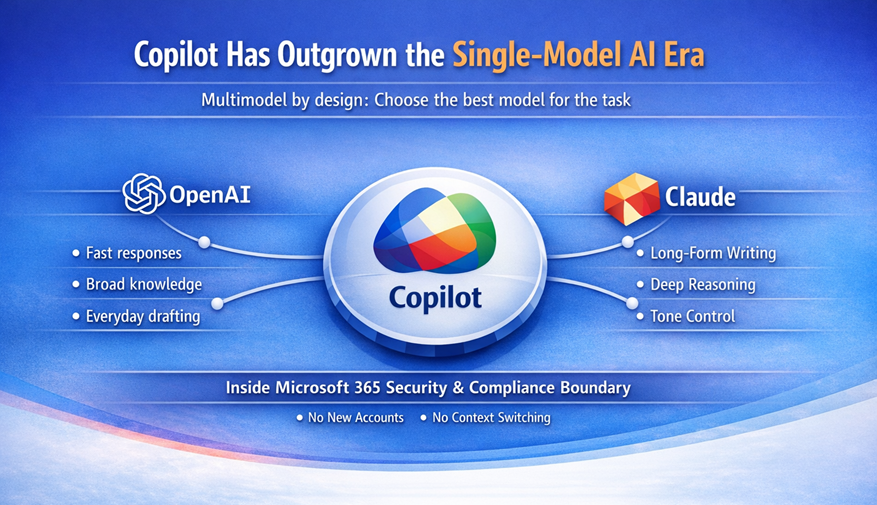
Why We Enabled Anthropic and the Frontier Program in Our Microsoft 365 Tenant and how we're giving our team the best AI tools — right inside the Microsoft ecosystem.
Introduction: The AI Model Race Is Real
AI model capabilities are improving at an extraordinary pace. Month over month, we’re seeing meaningful gains in long-form content creation, code generation, and agentic workflows that can reason and act across tools.
What’s becoming increasingly clear is that this is no longer a single-model world. Different models excel at different tasks; some shine at structured reasoning, others at coding, and others at nuanced writing and long-context understanding.
Microsoft’s response is significant. Rather than locking Copilot to a single model, Microsoft is evolving it into a multimodel platform, bringing best-in-class AI directly into the Microsoft 365 experience.
This article explains why we chose to enable Anthropic’s Claude and enrol in the Copilot Frontier program and how we did it, so our team can use the best model for the task without leaving the Microsoft ecosystem. We'll also touch on AI in Sharepoint, which also requires Anthropic to be turned on to work, but we'll save the full details for a follow-on article.
Why Claude? The Strategic Case
Through our own testing and ongoing conversations with Microsoft, Anthropic’s Claude has emerged as the better choice for several high-value scenarios.
Claude consistently performs exceptionally well in long-form content development, tone-controlled writing, complex coding tasks, and multistep reasoning, all of which are core to how our team works.
Microsoft's philosophy is simple: give people the best tool for the job, not force everything through a single model. What makes their approach compelling is that Claude isn’t a separate platform; it’s embedded directly into Copilot.
From a governance and admin perspective, this matters. There are no new accounts, no context switching, and no shadow IT, just stronger AI capabilities inside the Microsoft boundary you already manage.
What Is the Copilot Frontier Program?
The Copilot Frontier program provides early access to next-generation Copilot capabilities before they reach general availability. Frontier gives organizations visibility into where Copilot is going, not just where it is today.
As of writing date, Frontier includes access to Claude in Copilot Chat, advanced research scenarios, and Copilot Cowork, a Claude-powered agent designed for multistep workflows across Microsoft 365. This changes very quickly. We recommend you visit Frontier Program Features | Microsoft Frontier for an up-to-date list of features.
Claude at a Glance: Capabilities, Benefits, and Setup
Over the last few weeks, many of our internal discussions focused on where Claude shows up, which features require Frontier, and what needs to be enabled in the tenant. All of this also requires a full Microsoft 365 Copilot license. The table below consolidates all of this into a single reference point.
| Feature | Capabilities | Benefits | Setup Steps |
|---|---|---|---|
| Claude in Copilot Chat | Content drafting, summarization, Q&A | Best-fit model per task | Enable Anthropic models, Frontier |
| Claude Researcher | Deep research, long context analysis | Superior reasoning and synthesis | Enable Anthropic models |
| Copilot Cowork | Multi-step agentic workflows | Automation across M365 | Frontier + Preview licensing |
| Claude in Copilot Studio | Agent orchestration and prompts | Better reasoning for custom agents | Copilot Studio access |
| Content Development | Articles, blogs, webinars | Higher content quality | Anthropic enabled |
| Coding & Development | Code generation and review | Faster dev cycles | Copilot Chat / Studio |
Claude in Copilot Chat
Capabilities: Content drafting, summarization, Q&A
Benefits: Best-fit model per task
Setup: Enable Anthropic models, Frontier
Claude Researcher
Capabilities: Deep research, long context analysis
Benefits: Superior reasoning and synthesis
Setup: Enable Anthropic models
Copilot Cowork
Capabilities: Multi-step agentic workflows
Benefits: Automation across M365
Setup: Frontier + Preview licensing
Claude in Copilot Studio
Capabilities: Agent orchestration and prompts
Benefits: Better reasoning for custom agents
Setup: Copilot Studio access
Content Development
Capabilities: Articles, blogs, webinars
Benefits: Higher content quality
Setup: Anthropic enabled
Coding & Development
Capabilities: Code generation and review
Benefits: Faster dev cycles
Setup: Copilot Chat / Studio
Enabling Anthropic Claude in Your Tenant
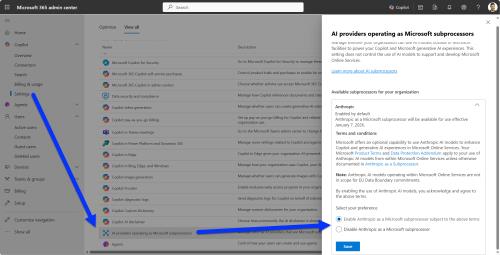
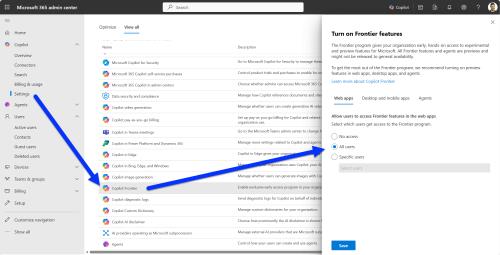
From an admin perspective, enabling Claude is refreshingly straightforward. An administrator enables Anthropic models in the Microsoft 365 Admin Center, verifies Copilot licensing, and Claude becomes available inside Copilot experiences. The same is true for Frontier. See below Microsoft 365 Admin Setup Steps for details.
Importantly, users do not need to separate Anthropic accounts. Everything runs within Microsoft’s existing security, identity, and compliance boundaries.
Claude Use Cases Inside Microsoft 365
Claude surfaces across multiple Copilot experiences, each suited to different types of work.
In Copilot Chat, users can select Claude for everyday writing, thinking, and summarization tasks. In Researcher, Claude excels at deep analysis of long or complex documents.
For teams building automation, Copilot Cowork and Copilot Studio allow Claude to power multistep agentic workflows, complex reasoning, and coding-focused agents.
What We Expect to See at Envision IT
It’s still early days, so we’ve only recently enabled these capabilities in our tenant. That said, our expectations are clear.
We expect significant improvements in content production, including articles, webinars, and campaign materials. We also anticipate faster development cycles for internal tools and client-facing solutions.
As Copilot Cowork and agent tooling mature, we expect to automate more of the work that currently requires manual coordination across tools.
Conclusion: Don’t Get Left Behind
AI capabilities are improving faster than most organizations can track. The real risk isn’t moving too early; it’s moving too late.
Microsoft’s multimodel Copilot strategy enables enterprises to adopt best-in-class AI while maintaining enterprise controls. For us, enabling Claude and Frontier unlocked a new level of capability with minimal overhead.
Microsoft 365 Admin Setup Steps
Both Anthropic support and Frontier are controlled in the Microsoft 365 Admin console. Copilot Settings are not in with the rest of the tenant settings, they are under the Copilot nav item top left. Switch to View All and you'll see Copilot Frontier and AI providers operating as Microsoft subprocessors as options. Anthropic is a tenant wide setting, but Frontier you can scope down to include or exclude specific users.
Subscribe to Modern Work Monthly
Get the latest Microsoft 365 + Copilot insights to help your teams work smarter, faster.
We respect your inbox. Unsubscribe anytime.